Chapter 19: The Solver
Backtracking you can watch, one step per frame
Chapter 17 already contained a solver. CountSolutions explores the search space by recursion, and it is nine lines. If all you need is an answer, that is the chapter's solver and you can stop reading.
This chapter writes it again, differently, for a reason that is entirely about running on a phone: a recursive solver can only be run to completion. You call it, and some number of milliseconds later — usually a few, occasionally a thousand — it returns. During that time your game draws nothing, responds to nothing, and looks broken.
Turning the recursion inside out, into an explicit stack held in a field, changes that. The search becomes a state machine you can advance one step at a time, which means it can do a hundred steps per frame and the game keeps running. And it means the search becomes visible — you can draw the cursor, watch it descend, and watch it back out of a dead end — which is by far the best way to understand what backtracking actually does.
Along the way the chapter covers the one heuristic that separates a solver which finishes in a few hundred steps from one that explores millions.
What you will learn in this chapter
- Why a recursive solver cannot be paused, and what to do about it on a phone.
- How to convert recursion into an explicit stack of frames, mechanically.
- What a frame has to remember, and why the candidate index lives in it.
- Why choosing the most-constrained cell first is the single most important optimisation.
- How to budget work per frame so the game stays responsive whatever the puzzle.
- How to tell "solved" from "exhausted", and why both are outcomes.
- The caveats: candidates recomputed per step,
ForceversusSet, and mutating the player's board.
The code for this chapter
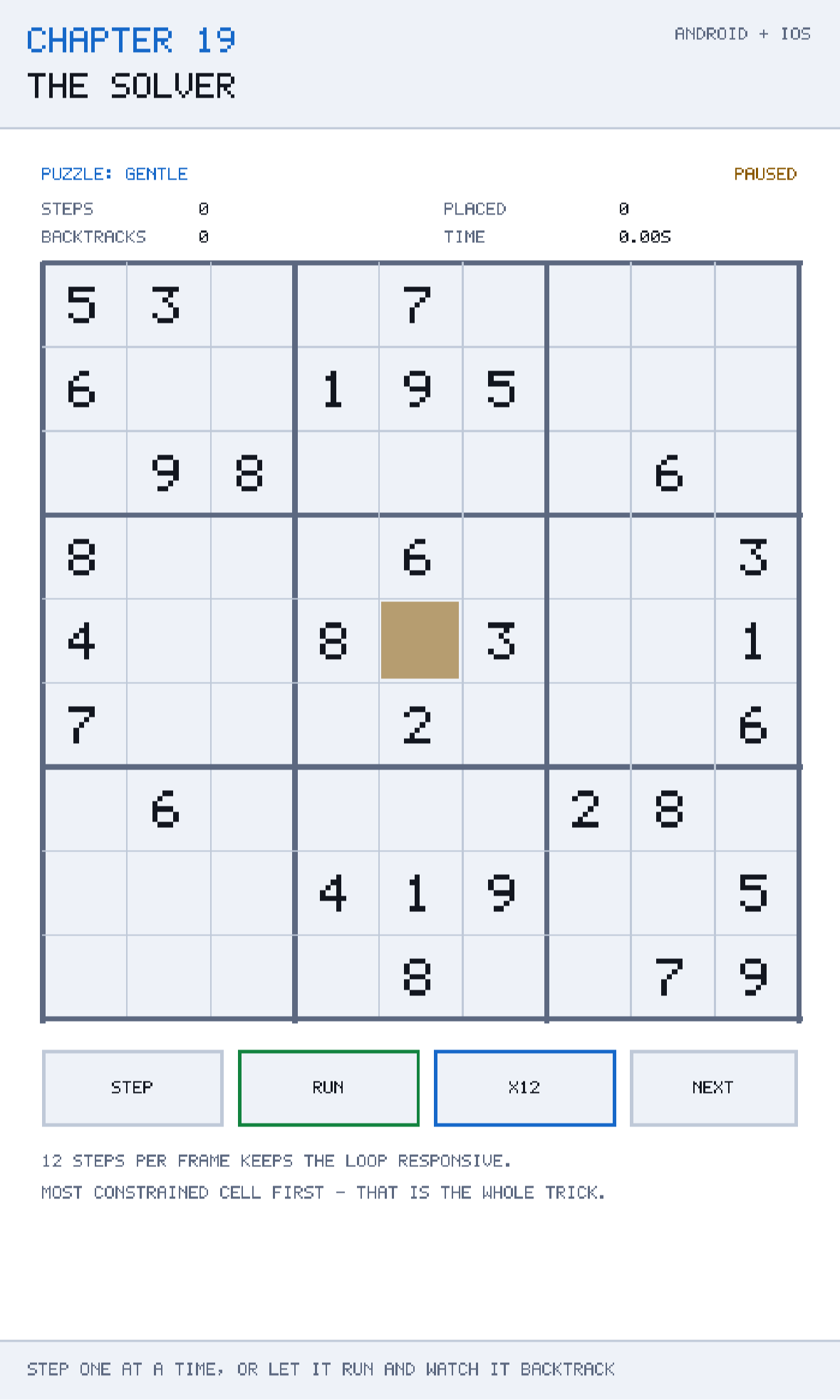
The demonstration is at github.com/nodoid/MonoGameBook/src/Chapter19. Step the solver one move at a time and watch it place digits; let it run and watch it back out of dead ends. The counters separate placements from backtracks, which is the shape of the search made visible.
Why not recursion
The class comment states the trade in full:
Recursion is the shorter code, but a recursive solver can only be run to completion, which on a phone means a frozen frame. Holding the stack in a field means Step can do one unit of work per frame and the game keeps drawing — and it also means the search is something a reader can watch happen.
Chapter 17 got around this by running generation on a worker thread, and that is a perfectly good answer when you only want the result. It is the wrong answer here for two reasons: you cannot easily watch work happening on another thread without synchronisation you do not want, and a solver used as a hint feature needs to be interruptible — the player may change their mind halfway through.
A resumable search also composes better. You can give it a budget that varies with how much frame time is left, pause it while the player is interacting, and abandon it without having to cancel anything.
Recursion to an explicit stack
The conversion is mechanical, and it is worth knowing as a technique because it applies to any recursive algorithm you need to pause.
A recursive call has three parts: the arguments, the local state, and the point to resume at when the call returns. A stack frame has to hold all three:
private sealed class Frame(int index, List<int> candidates)
{
    public int Index { get; } = index;
    public List<int> Candidates { get; } = candidates;
    public int Next { get; set; }
}
Index is the argument — which cell this frame is deciding. Candidates is the local state — the values worth trying, computed once when the frame was created. Next is the resume point: how far through the candidate list we had got when we descended into the next cell.
That third field is the one people miss. In a recursive foreach (int value in candidates), the loop's position is held for you by the language, on the real call stack. When you make the stack explicit, you have to hold it yourself, and Next is where.
One step
public bool Step()
{
    if (IsSolved || IsExhausted)
        return false;

    Steps++;

    if (stack.Count == 0)
    {
        IsExhausted = true;
        return false;
    }

    Frame frame = stack.Peek();

    // Every candidate for this cell has failed, so this cell was not the problem:
    // undo it and let the cell below try its next value.
    if (frame.Next >= frame.Candidates.Count)
    {
        board.Force(frame.Index, 0);
        stack.Pop();
        Backtracks++;
        return true;
    }

    int value = frame.Candidates[frame.Next++];

    if (!SudokuRules.IsLegal(board, frame.Index, value))
        return true;

    board.Force(frame.Index, value);
    Placements++;
    PushNext();
    return true;
}
Read it as four cases, in the order they are tested.
The search is over. IsSolved or IsExhausted — return false and do nothing more.
The stack is empty. Everything has been tried and nothing worked; the puzzle has no solution. IsExhausted is set, and it is a genuinely different outcome from IsSolved.
This frame is out of candidates. Every value for this cell has been tried and every one led to a dead end. Clear the cell, pop the frame, and count a backtrack. The comment says what the pop means: this cell was not the problem, so the fix has to come from a cell decided earlier.
Try the next candidate. Take it, advance Next, check legality against the board as it stands now, and if it is legal, place it and descend.
The re-check of legality is not redundant. Candidates was computed when the frame was pushed; since then, cells above may have changed. A candidate that was legal then may not be legal now, and skipping it — return true without placing — costs one step and keeps the frame's position intact.
Returning bool
Step returns whether it did anything. That single convention makes the budgeted runner two lines:
/// <summary>Runs up to <paramref name="budget"/> steps, so a frame stays a frame.</summary>
public int Run(int budget)
{
    int done = 0;
    while (done < budget && Step())
        done++;

    return done;
}
Call Run(200) from Update and the solver does at most two hundred steps this frame, whatever the puzzle. The game never stops drawing, the touch handling never stops responding, and a hard puzzle simply takes more frames than an easy one.
Choosing the budget is a measurement, not a guess: time one step, divide the frame budget you are willing to spend by it, and use that. Chapter 22 shows how to measure it. A number that leaves the solver using no more than about two milliseconds a frame is a good starting point.
The heuristic that matters
This is the most important code in the chapter:
/// <summary>
/// Picks the empty cell with the fewest candidates.
///
/// Trying the most constrained cell first is the whole difference between a solver
/// that finishes in a few hundred steps and one that explores millions.
/// </summary>
private int ChooseCell()
{
    int best = -1;
    int fewest = int.MaxValue;

    for (int index = 0; index < SudokuBoard.CellCount; index++)
    {
        if (!board.IsEmpty(index))
            continue;

        int count = SudokuRules.Candidates(board, index).Count;
        if (count >= fewest)
            continue;

        fewest = count;
        best = index;

        if (count <= 1)
            break;
    }

    return best;
}
Chapter 17's solver walked cells in index order — 0, 1, 2, and so on. That is correct and it is slow, because a cell with nine candidates creates nine branches, each of which creates more, and the tree explodes.
Choosing the cell with the fewest candidates does the opposite. A cell with one candidate creates one branch, which is not a guess at all — it is a deduction, and it can never be wrong. A cell with two creates two. By always taking the most constrained cell, the search spends its time where the branching factor is smallest, and dead ends are discovered close to where they were caused rather than fifty levels deeper.
This is known in constraint-solving as the minimum remaining values heuristic, and it is the single highest-value line in most backtracking searches. The difference on a hard Sudoku is typically three orders of magnitude in steps.
Two details in the implementation:
if (count <= 1) break; stops the scan early. A cell with one candidate is the best possible choice — nothing can beat it — so there is no point examining the rest. On a puzzle that is mostly deduction, this makes ChooseCell return almost immediately most of the time.
A cell with zero candidates also satisfies count <= 1, and returning it is exactly right: the frame is pushed with an empty candidate list, the very next Step finds Next >= Count, and the search backtracks immediately. The dead end is detected at the earliest possible moment rather than after eight futile placements.
Detecting the solution
private void PushNext()
{
    int index = ChooseCell();

    if (index < 0)
    {
        IsSolved = true;
        return;
    }

    stack.Push(new Frame(index, SudokuRules.Candidates(board, index)));
}
ChooseCell returns −1 when there are no empty cells. Since the solver only ever places legal values, no empty cells means a complete, legal board — the puzzle is solved. No separate completeness check is needed, and none is performed.
Watching it
Because the search is a data structure rather than a call stack, everything about it can be drawn:
/// <summary>The cell currently being decided, or -1 when the search is over.</summary>
public int Cursor => stack.Count > 0 ? stack.Peek().Index : -1;

public int Steps { get; private set; }
public int Backtracks { get; private set; }
public int Placements { get; private set; }
The cursor drawn on the grid is the single most illuminating thing in the chapter. Run the solver on an easy puzzle and the cursor walks steadily around the board, placing digits and never coming back — that is deduction, and there is almost no search in it. Run it on a hard one and the cursor descends, stops, backs up several cells, and tries again. Watching that once teaches backtracking better than any diagram.
The three counters make the shape of the search into numbers. Placements minus Backtracks is roughly the depth reached; a Backtracks figure close to Placements means the solver is guessing constantly, which for a well-formed puzzle usually means your heuristic is not working.
Use it as a hint button
A solver that can be stepped is a hint feature for free. Run it on a copy of the player's board until it makes its first placement, then reveal that one cell. Because the most-constrained cell is chosen first, the hint you give is the one a human would find next — which is exactly what makes a hint feel helpful rather than arbitrary.
Caveats
Candidates are recomputed constantly
ChooseCell calls SudokuRules.Candidates for every empty cell, and Candidates allocates a List<int> — Chapter 16's caveat, arriving as promised. On a board with fifty empty cells that is fifty allocations per PushNext, and a hard puzzle may push thousands of frames.
Two fixes, in order of effort. Use the CandidateMask from Chapter 16 and PopCount, which removes the allocation entirely and is faster. Or maintain candidate masks incrementally: when a value is placed, clear that bit from the twenty peers; when it is undone, restore it. That is how a fast Sudoku solver is written, and it is a substantial step up in complexity — worth it only if you are solving thousands of puzzles rather than one.
The solver mutates the board it is given
SudokuSolver takes a SudokuBoard and writes into it with Force. It cleans up after itself when it backtracks, so a completed search leaves either a solved board or the original — but a search that is abandoned halfway leaves a board full of speculative values.
Never hand it the player's live board. Hand it board.Clone(), which Chapter 15 made cheap for exactly this reason.
Force, not Set
board.Force(frame.Index, value) bypasses the given flags. That is necessary — the solver works on cells regardless of their origin — and it is another reason the board it works on should be a copy.
Depth is bounded, but the search is not
The stack can never exceed eighty-one frames, so memory is bounded. The number of steps is not: a puzzle with no solution and few clues can take an enormous number of steps to prove unsolvable. If you expose a solver to arbitrary input, cap the step count and report "gave up" as a third outcome alongside solved and exhausted.
One step is not one unit of time
A step that backtracks is cheap. A step that places a value calls PushNext, which scans every empty cell. So Run(200) is not a fixed amount of work, and on a nearly-empty board the placements are much more expensive than the backtracks. If you need tight frame control, budget by elapsed time rather than by step count — while (stopwatch.ElapsedMilliseconds < 2 && Step()).
Building and running this chapter
The solution is src/Chapter19/Chapter19.sln in the book's repository at github.com/nodoid/MonoGameBook/src/Chapter19.
cd src/Chapter19
dotnet build Android/Chapter.Android.csproj
dotnet build iOS/Chapter.iOS.csproj
To deploy to a connected Android device or a running emulator:
dotnet build Android/Chapter.Android.csproj -t:RunTo run on the iOS Simulator:
dotnet build iOS/Chapter.iOS.csproj -p:RuntimeIdentifier=iossimulator-arm64
xcrun simctl install booted \
  iOS/bin/Debug/net10.0-ios/iossimulator-arm64/Chapter19.iOS.app
xcrun simctl launch booted com.monogamebook.chapter19
Step it manually for the first thirty moves before letting it run. The manual mode is where the algorithm becomes obvious.
Try it yourself
- Step through the first twenty moves one at a time and watch the cursor. Note how often it places a value in a cell with exactly one candidate — those are deductions, not guesses.
- Replace
ChooseCellwith "the first empty cell in index order" and run it on the same puzzle. Compare the step counts; expect a difference of two or three orders of magnitude. - Remove the
if (count <= 1) break;early exit. The solver still works andChooseCellbecomes noticeably more expensive. - Feed it a deliberately contradictory board — two 5s in one row, entered with
Force— and watch it reachIsExhausted. - Change
Run(200)toRun(20000)and watch the frame rate collapse on a hard puzzle. That is the frozen frame this chapter exists to avoid.
Summary
A recursive backtracking solver is shorter, and it can only be run to completion. On a phone that means a frame that stops drawing for as long as the search takes, which for a hard puzzle is long enough to look like a crash.
Turning the recursion into an explicit stack is mechanical: each frame holds the cell being decided, the candidates worth trying, and — the field people forget — how far through that list the search had got. With the stack in a field, Step does one unit of work and returns, Run(budget) does as many as you can afford this frame, and the game never stops.
The single most valuable line in the solver is the choice of which cell to decide next. Taking the empty cell with the fewest candidates — minimum remaining values — means every branch is as narrow as possible and dead ends are found immediately; a cell with one candidate is a deduction rather than a guess, and a cell with zero fails on the very next step. Against index order, the difference on a hard puzzle is typically a thousandfold.
Because the search is a data structure, it can be drawn. The cursor descending and backing out is the clearest explanation of backtracking there is, and the placement and backtrack counters turn the shape of the search into two numbers you can read.
The costs to remember: Candidates allocates and is called for every empty cell on every push, so a serious solver uses bit masks; and the solver writes speculative values into the board it is given, so give it a clone.
Chapter 20 returns to the two games together, and to a problem both of them have: how to write the state of a game in progress to a device that may switch it off, mid-write, without warning.