Chapter 18: The Touch UI
Notes, undo and targets a thumb can actually hit
A Sudoku grid is nine cells wide. On a 480-unit-wide design space with a sensible margin, that gives each cell about 44 units — which, as it happens, is almost exactly the minimum touch target both Apple and Google recommend. That is not a coincidence so much as a lucky escape: a 9 × 9 grid is very close to the limit of what fits comfortably on a phone, and every decision in this chapter is constrained by it.
The interaction problems this creates are the interesting part. The player's finger is wider than the thing they are trying to hit. Their hand covers the bottom third of the board while they are using it. They will make mistakes and want to take them back. And they need somewhere to record "this cell is either a 4 or a 7", because that is how Sudoku is actually played.
Underneath all of that sits one structural decision that makes the chapter short: every edit goes through one method. Undo, redo, the mistake counter and pencil-mark clearing are then three or four lines each rather than three or four systems.
What you will learn in this chapter
- Why a single choke point for edits makes undo a small feature rather than a large one.
- How to represent one reversible edit, and why it must record both before and after.
- Why pencil marks are a nine-bit mask rather than a list or a set of booleans.
- How undo, redo and the discard-the-abandoned-future rule work.
- Why select-then-enter beats direct entry on a touch screen.
- Where the digit pad goes, and why the bottom of the screen is not obviously right.
- How same-digit highlighting turns a scanning task into a glance.
- The caveats: mistake counting needs a solution, notes and values interact, and 44 units is a floor not a target.
The code for this chapter
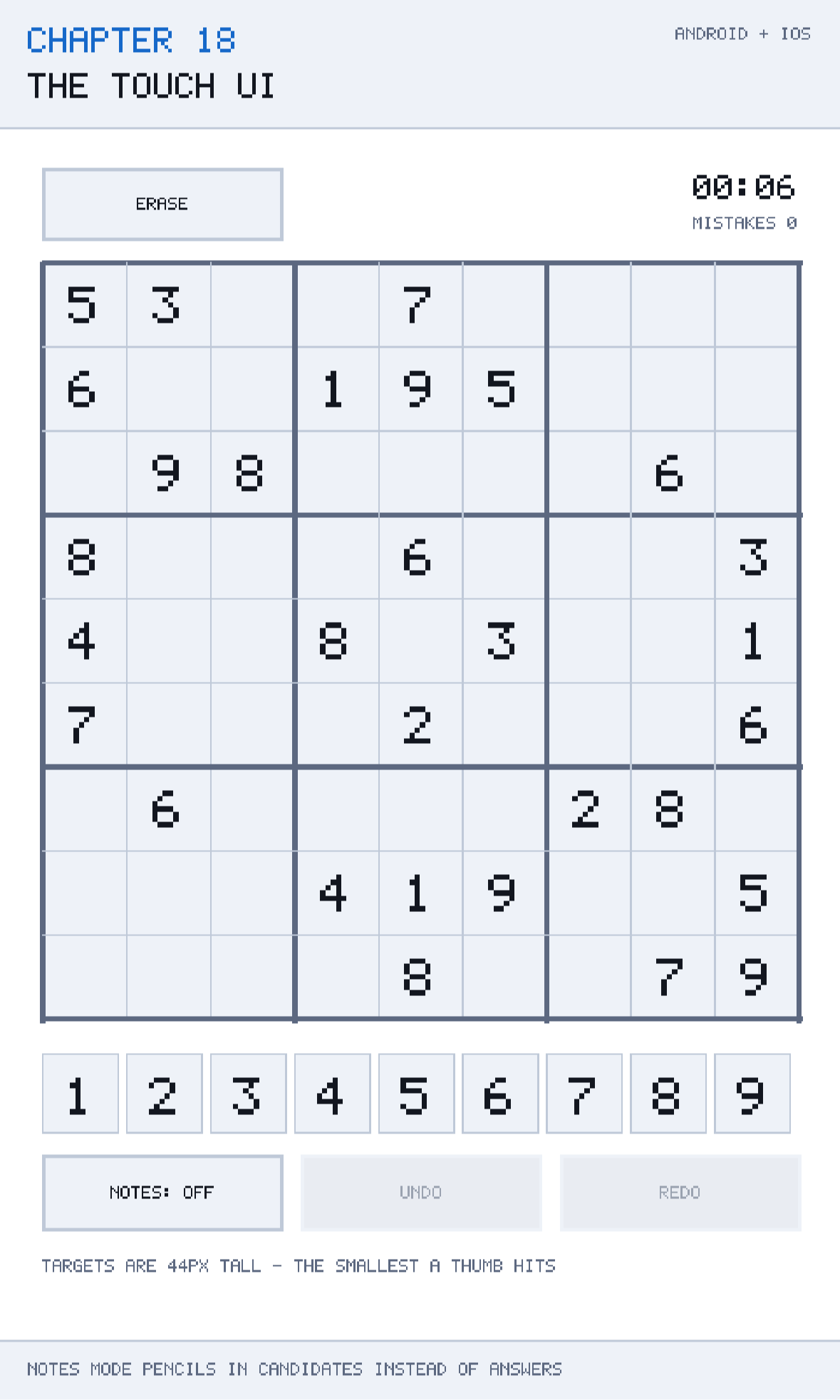
The demonstration is at github.com/nodoid/MonoGameBook/src/Chapter18. It is a playable Sudoku: select a cell, enter digits, switch to notes mode, undo, redo, and watch every cell holding the selected digit light up.
One method that changes the board
The session's class comment states the design in one sentence:
Undo is not a feature bolted on at the end. Every edit goes through Apply, which is the only place the board changes, and that single choke point is what makes undo, redo and a mistake counter three small methods rather than three separate systems.
This is worth taking seriously because the alternative is so common. A game that lets several code paths write to the board — the digit pad here, the erase button there, a hint feature over there — has to remember to record history in each of them, and the one that forgets is the one that breaks undo in a way that is very hard to trace.
private void Apply(Move move)
{
    // A new move after an undo discards the abandoned future, as every editor does.
    if (historyPosition < history.Count)
        history.RemoveRange(historyPosition, history.Count - historyPosition);

    Board.Set(move.Index, move.NewValue);
    notes[move.Index] = move.NewNotes;

    history.Add(move);
    historyPosition = history.Count;
}
Nine lines, and it is the entire mutation surface of the session. Everything else — Enter, Erase, and any feature you add later — constructs a Move and hands it over.
The move
public readonly record struct Move(
    int Index,
    int PreviousValue,
    int NewValue,
    int PreviousNotes,
    int NewNotes);
Five fields, and the important property is that it records the state both before and after. That is what makes undo and redo symmetrical: undo writes the previous values, redo writes the new ones, and neither needs to recompute anything or know how the move was produced.
The tempting economy is to store only the previous state — enough for undo — and to recompute redo by replaying. Do not. Replaying requires the operation to be deterministic and side-effect-free, which it may not stay, and it makes redo O(n) in the history length. Ten more bytes per move buys a redo that is as cheap as undo.
readonly record struct for the same reasons Chapter 7 gave for Vec2: it is a value, it needs equality, and a List<Move> of structs is one allocation rather than one per move.
Notes are carried in the move alongside the value, because a single player action can change both — entering a digit clears that cell's pencil marks — and undo has to restore both together. Splitting them into two history entries would make one undo take two taps.
Pencil marks as a bit mask
private readonly int[] notes = new int[SudokuBoard.CellCount];

/// <summary>Pencil marks for a cell as a 9-bit mask, bit 0 meaning the digit 1.</summary>
public int NotesOf(int index) => notes[index];

public bool HasNote(int index, int digit) => (notes[index] & 1 << digit - 1) != 0;
Nine possible marks per cell, so nine bits, so one int per cell — 324 bytes for the whole board. The alternatives are a HashSet<int> per cell (81 hash sets), a List<int> per cell (81 lists), or a bool[81, 9]. The mask beats all of them on size, on allocation, and — the deciding factor — on how easy it is to snapshot into a Move.
Toggling a mark is an exclusive-or:
Apply(new Move(index, previousValue, previousValue,
               previousNotes, previousNotes ^ 1 << digit - 1));
1 << digit - 1 is the bit for that digit — digit 1 is bit 0, digit 9 is bit 8 — and ^ flips it, so the same tap adds a mark or removes it. That is exactly the behaviour a player expects from a pencil.
Watch the precedence: 1 << digit - 1 parses as 1 << (digit - 1), because subtraction binds tighter than shift in C#. It is correct here, and it is worth parenthesising in your own code because roughly half of readers will not be sure.
The mask also makes drawing pencil marks trivial: loop 1 to 9, test the bit, draw the digit in its three-by-three sub-position. And it interoperates directly with Chapter 16's candidate mask, so "fill in all legal candidates" is one assignment.
Entering a digit
public void Enter(int digit)
{
    if (Selected < 0 || Board.IsGiven(Selected))
        return;

    int index = Selected;
    int previousValue = Board[index];
    int previousNotes = notes[index];

    if (NotesMode)
    {
        if (previousValue != 0)
            return;

        Apply(new Move(index, previousValue, previousValue,
                       previousNotes, previousNotes ^ 1 << digit - 1));
        return;
    }

    // Entering a value clears that cell's pencil marks: they have served their purpose.
    int newValue = previousValue == digit ? 0 : digit;
    Apply(new Move(index, previousValue, newValue, previousNotes, 0));

    if (newValue != 0 && solution.Length == SudokuBoard.CellCount &&
        solution[index] - '0' != newValue)
        Mistakes++;
}
Four behaviours are packed into that, and each is a decision a player will notice.
Nothing happens without a selection, and clues are never editable. The guard is at the top, so no path below it has to think about either case. Board.IsGiven is Chapter 15's flag doing its job.
Notes may not be placed on a filled cell. A pencil mark on a cell that already has a value is meaningless, and allowing it produces marks the player cannot see and cannot clear.
Tapping the same digit twice erases it. previousValue == digit ? 0 : digit makes the digit pad a toggle. On a phone this is worth a great deal: it means the player never has to find the erase button for the common case of "I meant 4, not 7".
Entering a value clears the cell's pencil marks. They were working notes for a cell that is now decided. Keeping them would clutter the cell and confuse the drawing code; clearing them is one 0 in the Move, and it is undone correctly for free because PreviousNotes was captured first.
Counting mistakes
The mistake counter compares against a known solution string:
if (newValue != 0 && solution.Length == SudokuBoard.CellCount &&
    solution[index] - '0' != newValue)
    Mistakes++;
This is a different thing from Chapter 16's conflict detection, and the difference matters. A conflict is a rule violation you can see on the board — two 5s in a row. A mistake is a digit that differs from the puzzle's actual answer, which may be perfectly legal at the moment you place it and only becomes a problem twenty moves later.
Counting mistakes therefore requires knowing the solution, which is why the session takes it in the constructor and why the length is checked before use — a session constructed without one simply does not count mistakes rather than throwing.
Whether to show the count is a design question. Many players find a mistake counter stressful; many others want it. Make it a setting, and remember that a counter only counts up — undoing a wrong digit does not decrement it, which is deliberate here and is worth deciding on rather than inheriting.
Undo and redo
public bool CanUndo => historyPosition > 0;
public bool CanRedo => historyPosition < history.Count;

public void Undo()
{
    if (!CanUndo)
        return;

    Move move = history[--historyPosition];
    Board.Set(move.Index, move.PreviousValue);
    notes[move.Index] = move.PreviousNotes;
    Selected = move.Index;
}

public void Redo()
{
    if (!CanRedo)
        return;

    Move move = history[historyPosition++];
    Board.Set(move.Index, move.NewValue);
    notes[move.Index] = move.NewNotes;
    Selected = move.Index;
}
A list plus a position, which is the standard shape and is better than two stacks: it makes CanUndo and CanRedo one comparison each, and it makes the history inspectable if you ever want to show it.
Selected = move.Index is a small thing that matters a lot in use. After an undo, the cell that changed is selected, so the player's attention — and the next digit they tap — goes to the right place. Without it, undo on a nine-by-nine grid leaves the player hunting for what just changed.
And the rule everyone expects without being able to state:
A new move after an undo discards the abandoned future, as every editor does.
Undo three moves, then make a new one, and the three you undid are gone. Anything else produces a history that is a tree, and a tree needs a UI to navigate it, which is not a thing a Sudoku app should have.
Undo through the board's Set
Note that Undo calls Board.Set, not Board.Force. It respects the given flag, which is correct: a move can never have modified a clue in the first place, so restoring one is never necessary, and going through Set means a corrupted history cannot damage the puzzle.
The touch layer
Select then enter
The grid is nine cells across a 480-unit design space. With a 20-unit margin each side, cells are about 44 units — right at the recommended minimum touch target, which is 44 points on iOS and 48 dp on Android.
Right at the minimum means direct entry — tap a cell, then a digit appears somewhere — is not viable, because there is no room for a popup that does not cover the board. The two-step model is better anyway:
- Tap a cell. It is selected; nothing has changed yet.
- Tap a digit on the pad. The digit goes in the selected cell.
Because step one is non-destructive, a mis-tap costs nothing — the player simply taps the right cell. Direct manipulation, where the first tap commits, makes every fat-fingered tap a mistake to undo.
It also means the digit pad can live outside the grid, in a comfortable area near the bottom of the screen where the digits can be 60 units across rather than 44.
Where the hand goes
Chapter 6 made the point that the player's hand covers the bottom third of the screen while they are touching it. On a Sudoku that has a specific consequence: put the digit pad at the very bottom and the player's hand covers rows 7, 8 and 9 every time they enter a digit — the rows they are most likely to be working on when they are near the end.
There is no perfect answer. The pad has to be reachable by a thumb, which means low. The compromise this chapter uses is to place the grid in the upper two-thirds and the pad below it with a gap, so the hand covers the pad and the empty gap rather than the grid.
Test one-handed, standing up
A layout that is fine with two hands and a table is often unusable with one thumb on a train. Chapter 8 made this point about control feel; it applies at least as strongly to hit targets.
Same-digit highlighting
When a cell containing a 7 is selected, highlight every other 7 on the board. This is the single highest-value affordance in a digital Sudoku, and it costs one pass over eighty-one cells.
The reason it matters is that scanning for a digit is the most common thing a player does and the least enjoyable — it is pure visual search with no thinking in it. Highlighting turns a ten-second scan into a glance, and the thinking is what the player came for.
Three levels of highlight, in decreasing strength, are worth drawing: the selected cell, its twenty peers from Chapter 16's cache, and every cell sharing its digit. Any more than three and the board becomes noise.
Caveats
The history is unbounded
history grows for the life of the session. For a Sudoku that is fine — a long game is a few hundred moves, and a Move is twenty bytes. For an application with thousands of edits, cap it and drop the oldest, and be aware that doing so makes the earliest states unreachable.
Notes and values can disagree after an undo
Undo restores both the value and the notes from the same Move, so they stay consistent. That is only true because they are captured together; if you later add a feature that changes notes without going through Apply — an "auto-fill candidates" button, say — it must produce a Move too, or undo will restore a value without its marks.
Mistake counting leaks the answer
The session holds the solution string in memory. That is unavoidable if you want mistake counting, and it means a determined player could extract it. For a single-player puzzle that is not worth defending against.
44 units is a floor, not a target
The guidelines say 44 points is the minimum. A grid cell at exactly the minimum is usable and not comfortable. If your design space allows it, give the digit pad noticeably larger targets than the grid — the pad is tapped far more often than any individual cell.
IsSolved recomputes conflicts
IsSolved => SudokuRules.IsComplete(Board) calls Conflicts, which allocates a HashSet — Chapter 16's caveat. Tick calls IsSolved every frame. Cache it on change, or take the bool[] approach, before this reaches a shipping build.
Building and running this chapter
The solution is src/Chapter18/Chapter18.sln in the book's repository at github.com/nodoid/MonoGameBook/src/Chapter18.
cd src/Chapter18
dotnet build Android/Chapter.Android.csproj
dotnet build iOS/Chapter.iOS.csproj
To deploy to a connected Android device or a running emulator:
dotnet build Android/Chapter.Android.csproj -t:RunTo run on the iOS Simulator:
dotnet build iOS/Chapter.iOS.csproj -p:RuntimeIdentifier=iossimulator-arm64
xcrun simctl install booted \
  iOS/bin/Debug/net10.0-ios/iossimulator-arm64/Chapter18.iOS.app
xcrun simctl launch booted com.monogamebook.chapter18
Play it properly for five minutes on a device, one-handed. That is the only way to evaluate a touch layout.
Try it yourself
- Add three pencil marks to a cell, then enter a value. Undo once — both the value and the marks come back, because they travelled in the same
Move. - Undo several moves, then enter a new digit. The redo history is gone, which is what every editor does.
- Remove
Selected = move.IndexfromUndoand use it for a minute. Finding what changed is surprisingly hard. - Change the notes toggle from
^to|and try to remove a pencil mark. You cannot — exclusive-or is what makes it a toggle. - Shrink the grid margin so cells are 38 units, and play one-handed. Then set it back.
Summary
The structural idea is one choke point. Every edit goes through Apply, so undo, redo, the mistake counter and pencil-mark clearing are small methods rather than separate systems, and a feature added later cannot forget to record history.
A Move records the state before and after, which makes undo and redo symmetrical and cheap, and it carries the notes alongside the value so a single player action is a single undo. Pencil marks are a nine-bit mask per cell — one int, toggled with exclusive-or — which beats every alternative on size, allocation and how easily it snapshots into a move.
The interaction model is select-then-enter, because a 44-unit cell is at the minimum recommended touch target and a non-destructive first tap makes a mis-tap free. Tapping the same digit twice erases it, so the common correction never needs the erase button. And after an undo, the changed cell is selected, so the player's attention lands where the change happened.
Two things are worth more than they cost: same-digit highlighting, which replaces the most tedious activity in Sudoku with a glance, and a layout that keeps the player's hand off the part of the grid they are working on.
Chapter 19 completes the puzzle half of the book with the solver — the same backtracking that generated the puzzle, slowed down to one step per frame so you can watch it think.