Chapter 17: Puzzle Generation
Fill a solution, then take clues away carefully
A Sudoku app that ships with fifty puzzles is a Sudoku app that a keen player finishes in a week. Generating puzzles is what turns it into something with no end, and the algorithm is short enough to fit on a page.
The short algorithm is also, in almost every published implementation, subtly wrong. It goes: fill a complete grid, then remove cells until you have the number of clues the difficulty calls for. That produces a grid that looks exactly like a Sudoku, plays exactly like a Sudoku right up until the last few cells, and then tells the player their correct answer is wrong — because the puzzle had two solutions and the app only knew about one.
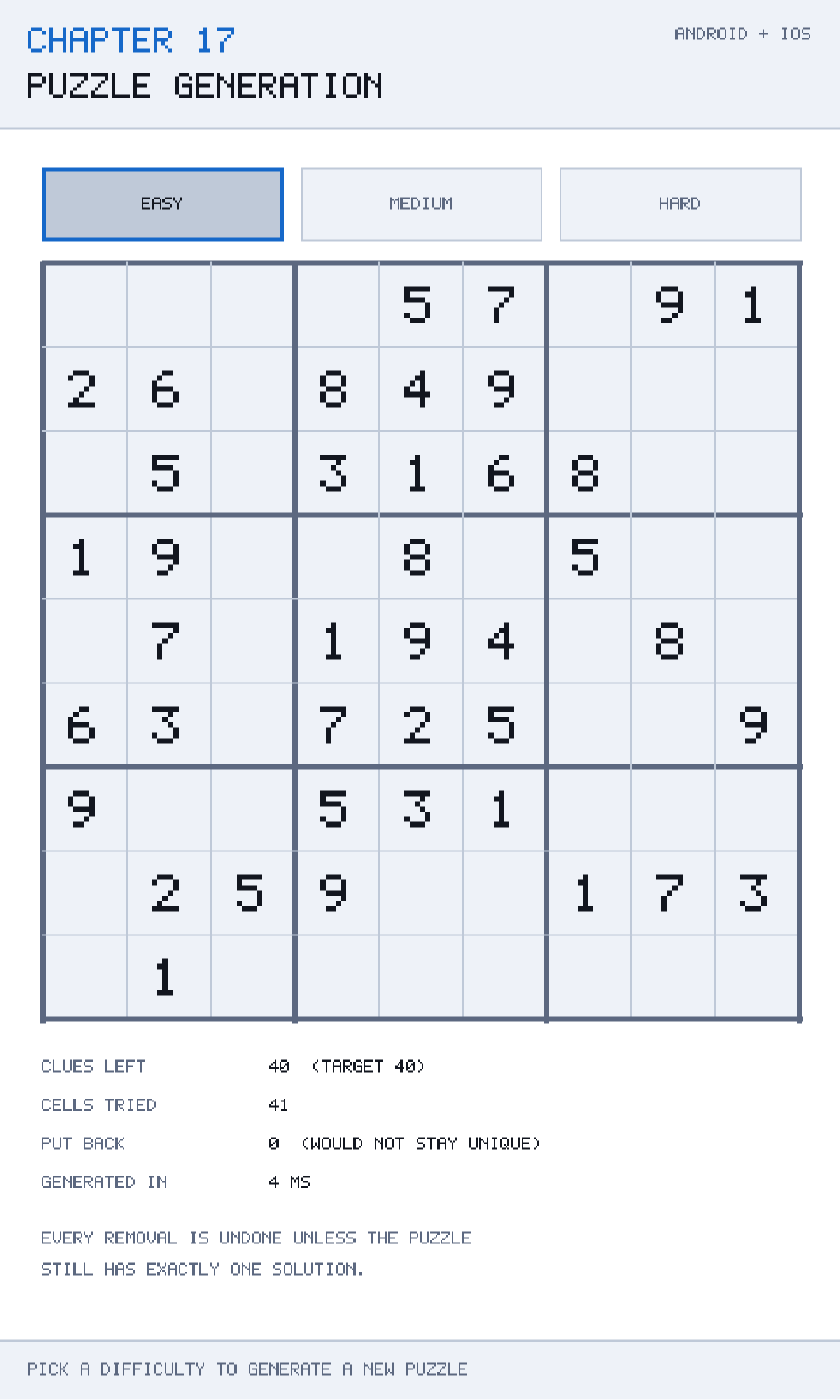
That failure is worth dwelling on, because it is the whole reason this chapter is longer than the algorithm. A player who is told their valid solution is invalid does not conclude that the puzzle was flawed; they conclude that the app is broken, and they are right. Every removal in this chapter's generator is undone unless the puzzle still has exactly one solution.
The chapter also deals with the practical consequence: verifying uniqueness is expensive, expensive things must not run on the frame thread, and a phone is a poor place to be doing hundreds of thousands of recursive calls without telling the user anything.
What you will learn in this chapter
- Why generation is fill-then-remove rather than place-clues-and-hope.
- How backtracking fills a complete grid, and why the value order must be shuffled.
- What uniqueness means for a puzzle and why a non-unique puzzle is a broken one.
- How to count solutions cheaply by stopping at two.
- Why difficulty is expressed as a clue count, and the limits of that as a measure.
- How to run generation on a worker thread and hand the result back safely.
- How to make the cost visible — cells tried, removals rejected, milliseconds spent.
- The caveats: recursion depth, the 17-clue floor, seeded reproducibility, and why clue count is not really difficulty.
The code for this chapter
The demonstration is at github.com/nodoid/MonoGameBook/src/Chapter17. It generates a puzzle on a worker thread and reports exactly what the run cost: how many cells it tried to empty, how many removals it had to undo, and how many milliseconds the whole thing took.
Fill first
You cannot generate a puzzle by placing clues at random and checking whether it is solvable; the overwhelming majority of random clue placements are contradictory or have millions of solutions. The reliable approach is to start from a *complete, valid* grid and take things away, because everything you produce is then guaranteed to be a subset of a real solution.
Filling a complete grid is textbook backtracking:
private bool Fill(SudokuBoard board, int index)
{
    if (index >= SudokuBoard.CellCount)
        return true;

    foreach (int value in Shuffled(Enumerable.Range(1, SudokuBoard.Size)))
    {
        if (!SudokuRules.IsLegal(board, index, value))
            continue;

        board.Force(index, value);
        if (Fill(board, index + 1))
            return true;

        board.Force(index, 0);
    }

    return false;
}
Walk the cells in order. For each, try the legal values; if one leads to a complete fill, you are done; if none does, undo and report failure to the caller, which will try its next value.
The three lines that make it backtracking rather than a greedy fill are Force(index, value), the recursive call, and Force(index, 0). That last one — undoing the choice before trying the next — is what people forget, and the symptom is a fill that gets stuck at around cell sixty and never completes.
SudokuRules.IsLegal from Chapter 16 is doing the work here, and this is the loop the peer cache exists for: a single fill performs a few hundred to a few thousand legality tests, and a full generation performs hundreds of thousands.
Why the values are shuffled
foreach (int value in Shuffled(Enumerable.Range(1, SudokuBoard.Size)))Try values 1 to 9 in order and backtracking is deterministic: it produces the same completed grid every single time. Every puzzle your app ever generates would be a rearrangement of one solution.
Shuffling the value order at each cell makes the fill explore the space of valid grids randomly. There are about 6.67 × 10²¹ valid Sudoku grids, so in practice you will never see the same one twice.
The shuffle is a Fisher-Yates, written out rather than reached for:
private List<T> Shuffled<T>(IEnumerable<T> source)
{
    List<T> items = [.. source];

    for (int index = items.Count - 1; index > 0; index--)
    {
        int swap = random.Next(index + 1);
        (items[index], items[swap]) = (items[swap], items[index]);
    }

    return items;
}
Note random.Next(index + 1) — the swap partner is chosen from the range including the current position. The common bug is random.Next(index), which excludes it and produces a distribution that is measurably biased. Note also that this is the generator's own seeded Random, so a given seed produces a given puzzle — which is what makes the demonstration reproducible and Chapter 21's tests possible.
Then remove, carefully
SudokuBoard puzzle = solution.Clone();
int target = TargetClues(difficulty);
int clues = SudokuBoard.CellCount;

foreach (int index in Shuffled(Enumerable.Range(0, SudokuBoard.CellCount)))
{
    if (clues <= target)
        break;

    tried++;
    int removed = puzzle[index];
    puzzle.Force(index, 0);

    if (CountSolutions(puzzle.Clone(), 0, 0) == 1)
    {
        clues--;
    }
    else
    {
        // Putting it back is what keeps the puzzle fair.
        puzzle.Force(index, removed);
        rejected++;
    }
}

puzzle.MarkGivens();
Visit the eighty-one cells in random order. Empty each one, ask whether the puzzle still has exactly one solution, and put it back if it does not.
The cell order is shuffled for the same reason the values were: removing in index order produces puzzles that are systematically emptier at the top-left, which is visually obvious and unpleasant.
MarkGivens at the end is Chapter 15's method, and it is what converts "a board with some numbers in it" into "a puzzle whose clues the player may not edit".
Counting solutions, and stopping at two
/// <summary>Counts solutions, stopping at two: "more than one" is all the caller needs.</summary>
private static int CountSolutions(SudokuBoard board, int index, int found)
{
    if (index >= SudokuBoard.CellCount)
        return found + 1;

    if (!board.IsEmpty(index))
        return CountSolutions(board, index + 1, found);

    for (int value = 1; value <= SudokuBoard.Size && found < 2; value++)
    {
        if (!SudokuRules.IsLegal(board, index, value))
            continue;

        board.Force(index, value);
        found = CountSolutions(board, index + 1, found);
        board.Force(index, 0);
    }

    return found;
}
The found < 2 in the loop condition is the optimisation that makes the whole generator practical. A puzzle with several solutions may have millions of them, and counting all of them takes for ever. The caller only ever asks "is it exactly one?", so as soon as a second solution is found the search unwinds and stops.
Structurally this is the same backtracking as Fill, with two differences: it does not stop at the first solution, and it skips cells that already have a value rather than trying to fill them.
Note puzzle.Clone() at the call site. CountSolutions mutates the board it is given — it has to, to explore — and cleans up after itself, but passing the live puzzle would be a correctness accident waiting to happen the first time somebody adds an early return. Chapter 15 made Clone cheap precisely so this can be done without thinking about it.
Difficulty, and its limits
public static int TargetClues(Difficulty difficulty) => difficulty switch
{
    Difficulty.Easy   => 40,
    Difficulty.Medium => 32,
    _                 => 26,
};
Forty clues is comfortable, thirty-two is a decent evening's puzzle, twenty-six is hard work. As a first approximation, fewer clues means harder — and it is only an approximation.
What actually makes a Sudoku hard is the techniques required to solve it. A puzzle solvable entirely by "this cell has only one candidate" is easy regardless of clue count; one that requires an X-wing or a forcing chain is hard even with forty clues. Two puzzles with twenty-six clues can be an order of magnitude apart in difficulty.
Grading properly means running a solver that only uses human techniques, in order of sophistication, and recording which ones were needed. That is a substantial piece of work — a chapter of its own — and it is why almost every casual Sudoku app grades by clue count and hopes. If you are building something serious, grade by technique; if you are building this, know what you are approximating.
There is a hard floor. It was proved in 2012, by exhaustive computer search, that no valid Sudoku with a unique solution can have fewer than 17 clues. Ask this generator for sixteen and it will simply stop removing when it cannot find another legal removal — the loop's if (clues <= target) break; never fires, and every remaining removal is rejected. It terminates, but it takes a long time doing it.
The cost, and where it must not run
GenerationResult is a record of what happened, not just what was produced:
public sealed record GenerationResult(
    SudokuBoard Puzzle,
    SudokuBoard Solution,
    int Clues,
    int CellsTried,
    int RejectedRemovals,
    double ElapsedMilliseconds);
Three of those six fields exist purely so the cost is visible, and the comment on the last is the whole point: *wall-clock cost, which is what decides if this can run on a phone.*
Typical figures on a modern device: fifty to eighty cells tried, fifteen to forty removals rejected, and anywhere from thirty milliseconds to well over a second for a hard puzzle. That range is the problem. Thirty milliseconds is two dropped frames — annoying. One second on the frame thread is an application that Android will offer to kill and that iOS users will assume has crashed.
Off the frame thread
Generation is a pure computation over data nothing else can see, which makes it about the easiest thing in a game to move onto a worker:
private Task<GenerationResult>? generation;

public void RequestPuzzle(Difficulty difficulty)
{
    if (generation is { IsCompleted: false })
        return;                       // one at a time

    generation = Task.Run(() =>
        new SudokuGenerator(Environment.TickCount).Generate(difficulty));
}

public void Update(float seconds)
{
    if (generation is { IsCompletedSuccessfully: true })
    {
        Adopt(generation.Result);     // back on the frame thread
        generation = null;
    }
}
Three rules make this safe, and they generalise to any background work in a game.
The worker touches nothing the frame thread can see. It constructs its own generator, its own Random and its own boards, and returns a finished object. There is no shared mutable state, so there is nothing to lock.
The result is adopted on the frame thread, inside Update, by polling the task. No callbacks marshalled from a background thread, no Invoke, no synchronisation context to get wrong. Polling a Task once per frame costs nothing and keeps every mutation of game state on one thread.
Only one runs at a time. A player tapping "new puzzle" repeatedly should not start eight generators; each would be doing hundreds of thousands of recursive calls, and on a phone that is a thermal event.
While it runs, show something. A spinner, the elapsed count, anything — a screen that has visibly not responded for 800 ms is a screen the player will tap again.
Generate ahead
The best user experience is to generate the next puzzle in the background while the player is solving the current one. By the time they finish, it is ready, and the wait is zero. This costs one field and is the single biggest improvement you can make to a puzzle app's feel.
Caveats
Recursion depth
Both Fill and CountSolutions recurse up to eighty-one levels deep. That is well within any platform's stack, including Android's smaller default thread stacks — but Task.Run uses a thread-pool thread whose stack size you do not control. Eighty-one frames of a small method is a few kilobytes and is safe; a variant board size of 16 × 16 would be 256 levels and still safe, but it is worth knowing where the limit lives.
The generator is not thread-safe
SudokuGenerator holds a Random, which is not thread-safe, and mutates the board it is filling. Construct one per generation — as the Task.Run above does — rather than sharing an instance.
Seeding from the clock
new SudokuGenerator(Environment.TickCount) gives a different puzzle each time and is unreproducible. For a shipping game, seed from the clock but record the seed with the puzzle: a player reporting "this puzzle is broken" can then be answered exactly. For tests, pass a fixed seed — Chapter 21 does.
Removal order affects clue count, not just aesthetics
Because a removal is only accepted if uniqueness survives, the order in which cells are visited affects how few clues you can reach. A different shuffle may reach twenty-six where another stalls at twenty-nine. If you need a guaranteed clue count, retry with a new seed rather than lowering the target.
It can take a long time at the bottom end
At twenty-six clues most removals are rejected, and each rejection costs a full solution count. The demonstration's RejectedRemovals counter makes this visible: an easy puzzle rejects a handful, a hard one rejects dozens. If generation time matters to you, cap it — a stopwatch check in the removal loop that accepts the current clue count when the budget is spent — and accept a slightly easier puzzle rather than a slow one.
Building and running this chapter
The solution is src/Chapter17/Chapter17.sln in the book's repository at github.com/nodoid/MonoGameBook/src/Chapter17.
cd src/Chapter17
dotnet build Android/Chapter.Android.csproj
dotnet build iOS/Chapter.iOS.csproj
To deploy to a connected Android device or a running emulator:
dotnet build Android/Chapter.Android.csproj -t:RunTo run on the iOS Simulator:
dotnet build iOS/Chapter.iOS.csproj -p:RuntimeIdentifier=iossimulator-arm64
xcrun simctl install booted \
  iOS/bin/Debug/net10.0-ios/iossimulator-arm64/Chapter17.iOS.app
xcrun simctl launch booted com.monogamebook.chapter17
Generate several puzzles at each difficulty and watch the elapsed time. The spread between an easy puzzle and a hard one is the reason this runs on a worker thread.
Try it yourself
- Generate ten easy and ten hard puzzles, and compare the rejected-removal counts. The rejections are the cost of fairness.
- Remove the shuffle from
Fill— passEnumerable.Range(1, 9)directly — and generate three puzzles. All three are the same grid. - Remove the
found < 2condition fromCountSolutionsand generate a hard puzzle. Be prepared to wait, and to force-quit. - Accept every removal without checking uniqueness, then solve the resulting puzzle by hand until you find a cell with two possible answers. That is the bug this chapter exists to prevent.
- Set the hard target to
16and watch the generator work for a long time and stop at seventeen. That floor is a proved mathematical result, not an implementation limit.
Summary
Generation is fill-then-remove. Backtracking fills a complete grid — with the value order shuffled at each cell, or every puzzle your app produces is a rearrangement of the same solution — and then clues are taken away in a shuffled order until the difficulty target is met.
The half that matters is uniqueness. A puzzle with two solutions plays like a real Sudoku until the moment it tells a player their correct answer is wrong, and that is a broken app rather than an interesting puzzle. Every removal is undone unless exactly one solution survives, and the counter that records how many removals were undone is the visible price of that guarantee.
Counting solutions is the same backtracking with one crucial addition: it stops at two. "More than one" is all the caller ever needs, and without that early exit a degenerate puzzle can have millions of solutions and take unbounded time to count.
Difficulty as a clue count — forty, thirty-two, twenty-six — is an approximation of the real thing, which is the sophistication of the techniques a solver needs. Know that you are approximating, and remember the seventeen-clue floor.
And it does not run on the frame thread. Generation is a pure computation over data nothing else can see, so Task.Run plus polling the task in Update is all the concurrency machinery required: nothing shared, nothing locked, every mutation of game state on one thread. Generating the next puzzle while the player solves the current one removes the wait entirely.
Chapter 18 puts all of this in front of a thumb — notes, undo, same-digit highlighting, and targets a finger can actually hit.