Chapter 13: The Highscore Table
Top six names and scores, strobing text, kept between launches
The high score table is the oldest feature in video games and one of the most instructive to build, because it is three genuinely different problems wearing one hat.
The first is a small data-structure problem: a fixed-size sorted list with a tie-breaking rule that is not the obvious one. The second is an input problem: entering a name on a phone, where the soft keyboard covers half the screen and drops your game out of full screen to show itself. And the third is the hard one — making the table still be there tomorrow, on a device whose operating system can kill your process between any two lines of code and owes you no warning.
That third problem is what most of this chapter is really about, and its answer generalises far beyond high scores. If you can write six names and six numbers so that they reliably survive a process kill, you can write a save game, and Chapter 20 will do exactly that with the same machinery.
What you will learn in this chapter
- Why a fixed-capacity table is "insert then drop", and the bug that appears when it is not.
- Why an equal score must rank below the incumbent, and what the wrong rule feels like to a player.
- How to build three-initial name entry, and why it beats a text field on a phone.
- How to write a file that survives being killed halfway: write to a temporary, then move.
- Where an app is allowed to write on Android and iOS, and the one API that works on both.
- Why the table is saved on every change rather than at exit.
- How to prove persistence actually works, rather than assuming it does.
- How a colour strobe should be written so it is readable and not unpleasant to look at.
The code for this chapter
The demonstration is at github.com/nodoid/MonoGameBook/src/Chapter13. Roll a score, enter three initials, and watch the colour wave run through the table. The BETWEEN RUNS tab is the interesting one: it counts launches, so you can prove the scores came off the disk rather than out of a constructor.
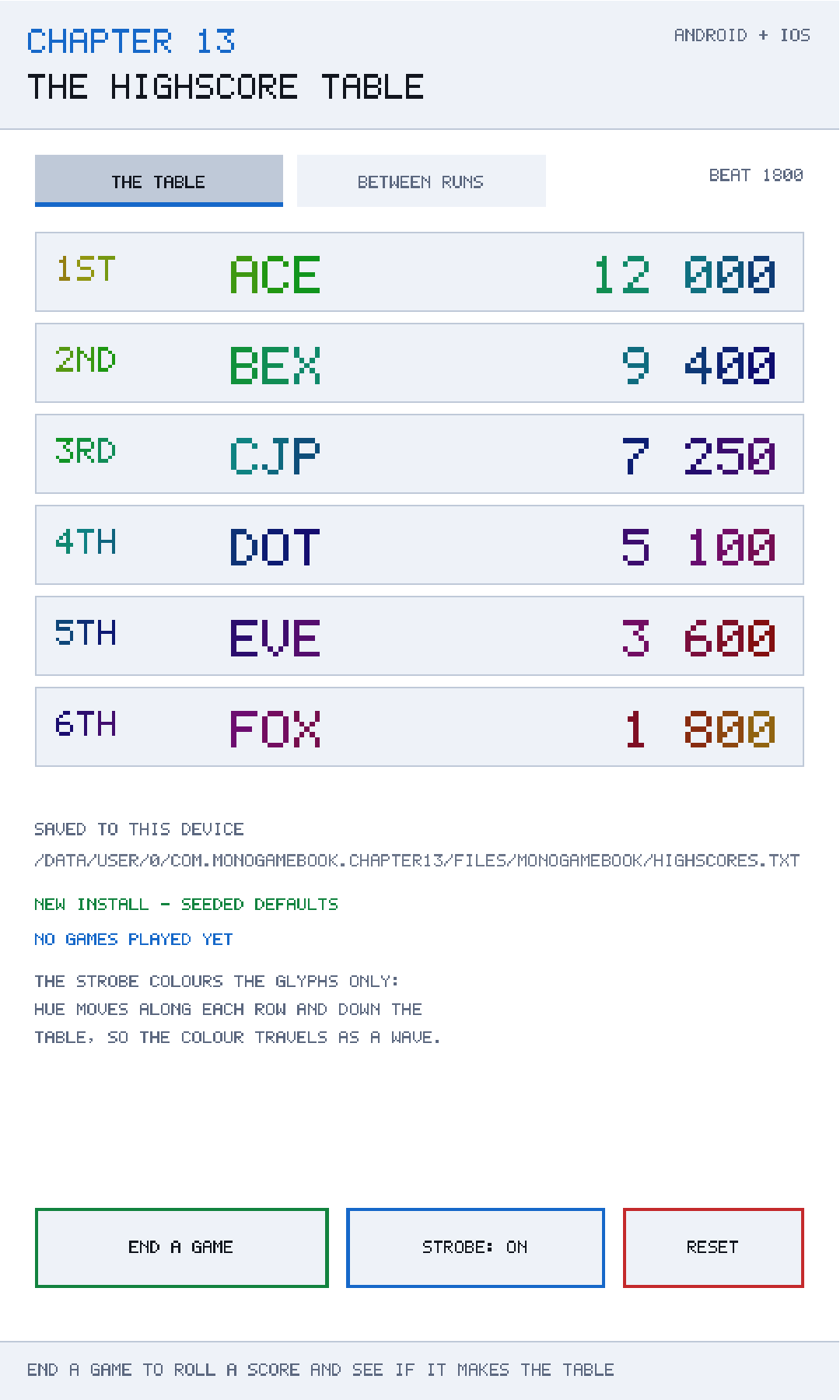
SpecialFolder.LocalApplicationData resolves to there: the application's own private files directory.The table
Two rules do all the work, and the class comment names both because both are easy to get wrong:
The table is a fixed size, so inserting is really "insert then drop the last one" — a list that quietly grows to a thousand entries is the usual bug. And a score equal to one already in the table ranks below it, because the player who got there first should not be pushed down by someone who merely matched them.
public int Insert(string name, int score, DateTime achievedUtc)
{
    if (!Qualifies(score))
        return -1;

    var entry = new HighScoreEntry(Normalise(name), score, achievedUtc);

    // Strictly greater, so an equal score settles behind the incumbent.
    int rank = entries.FindIndex(existing => score > existing.Score);
    if (rank < 0)
        rank = entries.Count;

    entries.Insert(rank, entry);

    if (entries.Count > Capacity)
        entries.RemoveRange(Capacity, entries.Count - Capacity);

    return rank;
}
The strictly-greater rule
score > existing.Score finds the first entry the new score genuinely beats. Change it to >= and a player who matches the top score displaces the person who set it — which is wrong in a way players notice immediately and describe as the game "stealing" their record.
It also has a practical consequence: the table is stable under repeated identical scores. Score 5000 six times and you get six entries in the order they were achieved, not six shuffles of the same number.
Insert then drop
RemoveRange(Capacity, entries.Count - Capacity) is the fixed-size discipline. Without it the list is sorted and unbounded: correct on screen, because you only draw six, and quietly growing for ever in memory and in the save file. This is a bug that never manifests during testing and shows up as a save file that has grown to a megabyte after a year.
Returning the rank
Insert returns the zero-based rank, or −1. That is exactly what the presentation layer needs — to say "3RD PLACE!" and to emphasise the new row — and it is information the table already has. Recomputing it afterwards by searching for the entry you just added is both slower and, if two entries are identical, wrong.
public static string RankLabel(int rank) => rank switch
{
    0 => "1ST",
    1 => "2ND",
    2 => "3RD",
    _ => $"{rank + 1}TH",
};
Small, and worth having in Core where it can be tested, because English ordinals are a classic source of "4TH, 5TH, 6TH, 7TH... 21TH".
Normalising names
public static string Normalise(string name)
{
    string trimmed = new(name.Trim().ToUpperInvariant()
                             .Take(NameLength).ToArray());
    return trimmed.PadRight(NameLength, ' ');
}
Every name that enters the table is exactly three upper-case characters, padded if short and truncated if long. Doing this at the boundary — rather than trusting callers — means the renderer can assume a fixed width, the serialiser can assume no surprises, and a corrupted file cannot inject a two-hundred-character name that breaks the layout.
Seeded defaults
/// <summary>The table a brand new install starts with, so the screen is never empty.</summary>
public static HighScoreTable Default()
An empty high score table on a fresh install looks broken. Worse, it gives the player nothing to aim at, and "beat the lowest score on the board" is the entire motivation the feature exists to create. Six seeded entries with a sensible spread — 12,000 down to 1,800 — turn a blank screen into a ladder.
Name entry without a keyboard
The obvious implementation is a text field. On a phone, that means the soft keyboard, and the source is direct about why that is the wrong choice:
A soft keyboard covers half a phone screen, changes size between devices, and drops the game out of full screen to show itself. Three tappable letters do not.
All three problems are real. The keyboard's height varies by device, language and whether the user has a suggestion bar; on Android, showing it can resize your surface and trigger the viewport recalculation from Chapter 5; and on both platforms it visually breaks the illusion that the player is in a game rather than in a form.
The arcade solution needs no keyboard at all:
private const string Alphabet = "ABCDEFGHIJKLMNOPQRSTUVWXYZ0123456789 ";

private readonly int[] letters = new int[HighScoreTable.NameLength];

public string Name => new([.. letters.Select(index => Alphabet[index])]);

public void Next(int slot)     => letters[slot] = (letters[slot] + 1) % Alphabet.Length;
public void Previous(int slot) => letters[slot] = (letters[slot] + Alphabet.Length - 1) % Alphabet.Length;
Three slots, each an index into a fixed alphabet, cycling with modular arithmetic. The + Alphabet.Length in Previous is there because C#'s % returns a negative result for a negative left operand — (0 - 1) % 37 is −1, not 36. This is the single most common bug in wrap-around code.
One detail elevates it from adequate to good:
/// <summary>Starts a fresh entry, seeded from the last name used.</summary>
public void Begin(string previous)
Players enter the same initials every time. Seeding from the previous name means that after the first entry, getting on the board is three confirmations rather than thirty taps. It costs four lines and it is the difference between a feature people use and one they skip.
Persisting it
Where an app may write
Android and iOS both sandbox your application, and both have several directories with different backup and eviction rules. Rather than write platform code, use the .NET abstraction that already maps to the right place on each:
private static readonly string StorageDirectory = Path.Combine(
    Environment.GetFolderPath(Environment.SpecialFolder.LocalApplicationData),
    "MonoGameBook");
On Android this resolves inside your app's private files directory; on iOS it resolves inside the app container's Library area. Both are private to your app, both survive updates, and both are removed when the app is uninstalled — which is what you want for a local high score table.
Do not use the app bundle
The directory your executable lives in is read-only on both platforms. Writing there fails at runtime with a permissions error, and it fails only on device — desktop debugging happily writes next to the executable and hides the bug.
The atomic write
This is the important part of the chapter:
public bool Write(string contents)
{
    try
    {
        File.WriteAllText(TemporaryPath, contents);
        File.Move(TemporaryPath, Path, overwrite: true);

        LastOutcome = "WRITTEN";
        return true;
    }
    catch (Exception error)
    {
        LastOutcome = $"WRITE FAILED: {error.GetType().Name}";
        return false;
    }
}
Write to highscores.txt.tmp, then move it over highscores.txt. The reasoning, from the source:
A phone can kill the process between any two lines: a move is atomic, a write is not, and a half-written file loses everything rather than just the newest change.
Consider the alternative. File.WriteAllText(Path, contents) truncates the target and then writes. If the process is killed between those two operations — and on a phone it can be, at any time, because the user switched apps and the system needed memory — the file on disk is empty or partial. The player has lost not just their new score but every score.
A move within the same filesystem is a rename, which the operating system performs atomically. Either the old file is there or the new one is; there is no intermediate state. This one substitution turns "you might lose everything" into "you might lose the last change", which is a completely different quality of failure.
For a larger or more valuable file you would go further: write the temporary, fsync it so the bytes are actually on the medium rather than in a cache, then rename, then fsync the directory. .NET does not expose fsync directly, and for a six-line text file the exposure is small enough that the rename alone is a reasonable stopping point. Chapter 20 revisits this with a checksum and a version number.
Saving on every change
HighScoreStore writes the table whenever it changes rather than at shutdown, and the source explains why that is not paranoia:
On a phone that is not belt and braces, it is the only reliable option: the operating system can stop the process at any moment and owes you no warning, so the last change is the one you must not lose.
There is no reliable "the app is closing" callback on mobile. Game.Exiting may not run. Android's OnDestroy is explicitly documented as something the system may skip. iOS gives you a few seconds on backgrounding, and not always. Any design that batches writes until exit is a design that loses data.
For six lines of text, writing on every change costs nothing measurable. For a large save file it would not be, and the answer there is to write on meaningful checkpoints — end of level, end of wave — rather than at exit.
Failing loudly
Both PersistentFile and HighScoreStore carry a LastOutcome string that the demonstration displays: WRITTEN, READ FROM DISK, NOTHING SAVED YET, WRITE FAILED: UnauthorizedAccessException. This is the same instinct as Chapter 12's audio Status. Storage fails for reasons you cannot control — a full disk, a restricted profile, a sandbox misconfiguration — and a game that silently forgets things is far harder to diagnose than one that says why.
A format you can read
The table serialises to one line per entry:
public string Serialize() =>
    string.Join('\n', entries.Select(entry =>
        $"{entry.Name}|{entry.Score}|{entry.AchievedUtc:O}"));
Pipe-separated text, not JSON and not a binary blob. For six rows that is a deliberate choice with three benefits: you can read the file with cat while debugging, a corrupted line is visibly corrupted, and there is no serialiser version to break when you add a field.
The parser is correspondingly forgiving:
foreach (string line in text.Split('\n', StringSplitOptions.RemoveEmptyEntries))
{
    string[] parts = line.Split('|');
    if (parts.Length != 3 || !int.TryParse(parts[1], out int score))
        continue;
    ...
}
Skip what you cannot parse; do not throw. A single bad line costs one entry, not the whole table. This is the right default for anything you read off a device you do not control.
The date parse carries a detail that catches almost everybody:
DateTime achieved = DateTime.TryParse(
    parts[2],
    CultureInfo.InvariantCulture,
    DateTimeStyles.RoundtripKind,
    out DateTime parsed) ? parsed : DateTime.UtcNow;
InvariantCulture because a file written on a device set to one locale must parse on another. RoundtripKind because without it a UTC timestamp is silently reinterpreted as local time, and your scores drift by the timezone offset every time they are loaded and saved. And :O on the way out, which is the round-trip format those two settings expect.
Proving it actually persists
This is the part of the chapter that is genuinely unusual, and it exists because of a real trap:
A high score table that reloads correctly looks identical to one that was seeded from defaults, so the chapter counts launches: if the count goes up and the scores stay put, the scores really did come off the disk rather than out of the constructor.
If your table is seeded with sensible defaults — as it should be — then "persistence works" and "persistence silently fails and re-seeds" look exactly the same on screen. Plenty of shipped games have had broken save systems for months for this reason.
RunRecord is the evidence:
public sealed record RunRecord(
    int RunCount,
    DateTime FirstRunUtc,
    DateTime LastStartUtc,
    DateTime PreviousEndUtc,
    int ScoresSaved);
Launch count, first-ever launch, this launch, when the previous run ended, and how many scores have ever been written. If RunCount is 5 and FirstRunUtc is three days ago, then the file is genuinely being read from disk — no constructor produces those values.
LoadedFromDisk on the store makes the same point directly:
public HighScoreTable Load()
{
    string? contents = file.Read();

    if (contents is null)
    {
        LastOutcome = "NEW INSTALL - SEEDED DEFAULTS";
        LoadedFromDisk = false;
        return HighScoreTable.Default();
    }
    ...
}
Three outcomes, distinguished: nothing saved yet, a file that parsed to nothing, and a real load. A game that cannot tell those three apart cannot tell you why the player's progress vanished.
The strobe
Arcade high score tables cycle colour, and reproducing that is a good excuse to talk about doing an effect responsibly. The design constraints are in the source comment:
The effect is deliberately confined to the glyphs: strobing a filled background is how you get a screen that is unreadable and, for some players, genuinely unpleasant to look at.
Three decisions follow from that.
Only the glyphs change colour. Backgrounds stay put. A large flashing area is both harder to read and a genuine accessibility hazard; the WCAG guidance is to avoid anything that flashes more than three times a second over a large area, and a full-screen strobe is exactly that.
The hue shifts per character and per row, so the colour travels as a wave:
public float HueFor(int row, int character) =>
    Wrap(Elapsed * Speed + row * RowShift + character * CharacterShift);
A wave reads as movement; a synchronised flash reads as a fault.
Brightness never reaches zero.
public float BrightnessFor(int row, int character, bool emphasised)
{
    if (!IsEnabled)
        return 1f;

    float phase = (Elapsed * Speed + row * RowShift +
                   character * CharacterShift) * MathF.Tau;
    float wave = 0.5f + 0.5f * MathF.Sin(phase * (emphasised ? 2f : 1f));
    float floor = emphasised ? FloorBrightness - 0.12f : FloorBrightness;

    return floor + (1f - floor) * wave;
}
FloorBrightness is 0.72, so the text varies between 72% and 100% brightness and never disappears. IsEnabled returning a flat 1 gives you the accessibility switch for free — expose it in your settings screen.
The HSV-to-RGB conversion lives in Core, and the comment says why: *it is arithmetic with no graphics device in it, which means the colour ramp can be tested.* Colour conversion is exactly the sort of code that is easy to get subtly wrong and easy to verify against known values.
Caveats
Local scores are not secure
highscores.txt is plain text in your app's sandbox. On a rooted or jailbroken device it can be edited. That is fine — it is a local table on a single-player game, and defending it is not worth the complexity. If scores are competitive, they belong on a server, and the server must not trust the client's number.
Clock changes
DateTime.UtcNow comes from a clock the player can change. A score achieved "in the future" will sort oddly if you ever break ties by time. Use timestamps for display and for auditing, not as a source of truth.
The temporary file can be left behind
If the process dies between the write and the move, highscores.txt.tmp survives. It is harmless — the next write overwrites it — but a tidy implementation deletes stale temporaries at startup, and a paranoid one treats a surviving temporary as a signal that the previous run crashed.
One writer only
This design assumes a single process writing the file. That is true for a game. If you ever add a widget or a share extension that touches the same file, you need real locking, and the atomic-move trick is not sufficient on its own.
Building and running this chapter
The solution is src/Chapter13/Chapter13.sln in the book's repository at github.com/nodoid/MonoGameBook/src/Chapter13.
cd src/Chapter13
dotnet build Android/Chapter.Android.csproj
dotnet build iOS/Chapter.iOS.csproj
To deploy to a connected Android device or a running emulator:
dotnet build Android/Chapter.Android.csproj -t:RunTo run on the iOS Simulator:
dotnet build iOS/Chapter.iOS.csproj -p:RuntimeIdentifier=iossimulator-arm64
xcrun simctl install booted \
  iOS/bin/Debug/net10.0-ios/iossimulator-arm64/Chapter13.iOS.app
xcrun simctl launch booted com.monogamebook.chapter13
To test persistence properly, launch it, add a score, then force-quit the app rather than backgrounding it, and launch again. The run count on the BETWEEN RUNS tab should increase and your score should still be there.
Try it yourself
- Add a score, force-quit, relaunch, and check the run count. Then delete the file from the app's tab and relaunch: the count resets and the defaults come back.
- Change
score > existing.Scoreto>=and add two identical top scores. The second one displaces the first. - Remove the
RemoveRangecall and add twenty scores. The screen still shows six; the file grows for ever. - Replace the temporary-file write with a direct
File.WriteAllText(Path, contents), then kill the app during a save. You will need several attempts, and when it works you will lose the whole table. - Set
FloorBrightnessto0fand watch the text disappear on every cycle. That is why the floor is there.
Summary
A fixed-size high score table is "insert then drop", and the tie-break must be strictly greater so a matching score settles behind the player who got there first. Returning the rank from Insert gives the presentation layer what it needs without a second search, and normalising names at the boundary means nothing downstream has to defend against a bad one.
Name entry on a phone is three cycling letters, not a text field. The soft keyboard covers the screen, resizes the surface and breaks full screen; three tappable slots do none of that, and seeding them from the last name used turns thirty taps into three.
Persistence is the real content. Write to a temporary file and rename it, because a rename is atomic and a write is not, and a phone can kill your process between any two lines. Save on every change, because there is no reliable "we are closing" callback on mobile. Use SpecialFolder.LocalApplicationData so the same code finds the right sandboxed directory on both platforms. Skip lines you cannot parse rather than throwing, and parse dates with InvariantCulture and RoundtripKind or your timestamps will drift.
And prove it. A table that silently re-seeds looks exactly like one that loaded correctly, so count the launches — if the count goes up and the scores stay put, the disk is genuinely being read.
Chapter 14 turns to the layer above all of this: the particles, the shake and the easing curves that make a game feel finished — and the budget within which a phone will let you have them.