Chapter 12: SFX and Sound
Laser, explosions and the march, driven by game events
Turn the sound off in an arcade game and it stops being tense. That is not a figure of speech: the original 1978 invader machine had four notes that sped up as the aliens thinned out, and that single loop does more for the feel of the game than the artwork does. It is the game state, made audible.
Which is the argument of this chapter. Sound is not decoration bolted onto the renderer at the end of a project; it is another view of the same state, and it deserves the same treatment as everything else in this book — the decisions live in Core, where they can be tested without audio hardware, and only the part that actually makes a noise touches MonoGame.
This is also the one chapter in the book that ships real content: seven WAV files, loaded without the content pipeline at all. So along the way it is a practical guide to the parts of mobile audio that go wrong — bundling, formats, seekable streams, voice limits, and the device that has no working audio and must leave you with a silent game rather than no game.
What you will learn in this chapter
- How to split audio into a decision layer that can be tested and an output layer that cannot.
- Why per-sound gain, retrigger gaps and voice limits belong in code rather than baked into the files.
- What a retrigger gap is, and why eight explosions in one frame sound like a click.
- How to derive the march tempo from the number of aliens left, so audio follows the game rather than a timer.
- How to load a bundled sound on both platforms with
TitleContainer, and why the stream must be copied first. - Why
SoundEffectInstanceobjects must be pooled, and how a simple pool works. - How to make a silent device explain itself instead of looking broken.
- The caveats: WAV format tags, the iOS silent switch, interruptions, latency and asset licensing.
The code for this chapter
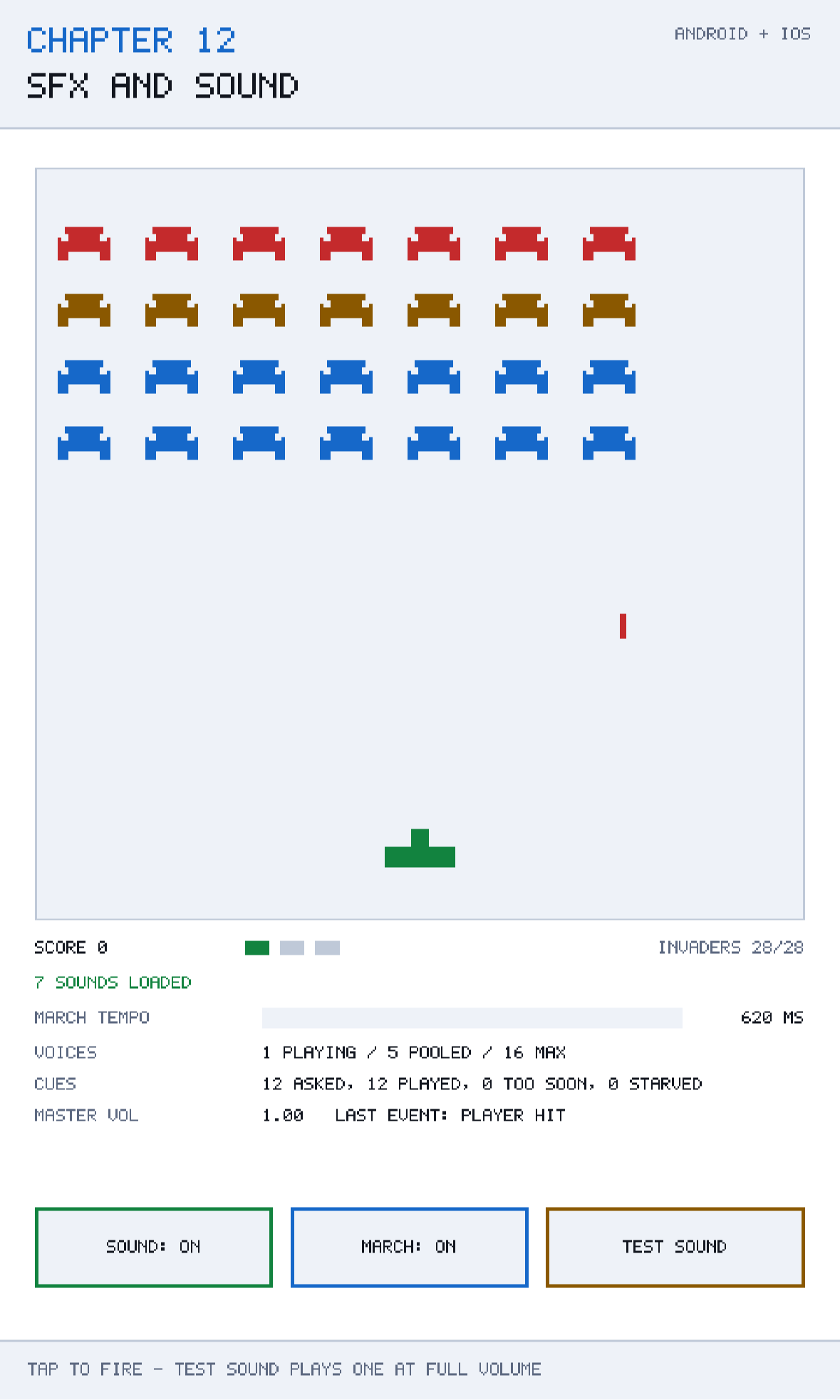
The demonstration is at github.com/nodoid/MonoGameBook/src/Chapter12. Play it with the sound on: a laser when you fire, a dry pop when an invader dies, a long boom when you do, and a four-note march that gets faster as the formation thins.
Two layers, one boundary
The split is the design:
| Layer | Project | Knows about | Responsibility |
|---|---|---|---|
SoundDirector, SoundBank, MarchDrone | Core | Nothing but numbers | What should be heard |
Audio | Shared | SoundEffect, SoundEffectInstance | How to make a noise |
Game code never touches an audio type. It says "an invader died", and something else decides whether that is audible right now:
director.Request(SoundId.InvaderHit,
                 pan: SoundDirector.PanFor(alien.X, fieldWidth));
This buys two specific things, and they are both worth the small amount of ceremony.
The mixing rules become testable. Retrigger gaps, per-sound voice limits and muting are arithmetic over a clock, and Chapter 21 runs them as a test suite with no audio device anywhere near them.
The call site is platform-free. Request compiles into Core, which has no MonoGame reference, so the same line works in both heads and in a unit test.
SoundBank: rules as data
SoundBank holds four things about each sound, and none of them are in the files:
public static float GainOf(SoundId id) => id switch
{
    SoundId.Laser      => 0.60f,
    SoundId.InvaderHit => 0.70f,
    SoundId.PlayerHit  => 0.95f,
    _                  => 0.55f,
};
The source comment explains why, and it is a lesson learned the hard way:
The gains are here rather than baked into the files because balance is a decision you will want to change a dozen times, and re-exporting a WAV to make an explosion quieter is a miserable way to spend an afternoon.
There is a second, less obvious reason. A gain in code can be changed by a variable — quieter during a menu, ducked under a voice line, scaled by an accessibility setting. A gain baked into a waveform can only be changed by an artist.
The values themselves carry an assumption worth stating out loud, and the source states it:
These are set for a phone speaker held at arm's length, not for headphones in a quiet room. The march in particular has to sit well above a whisper: it is the only sound playing when nothing else is happening, so if it is timid the game simply sounds broken.
Mix on the target device. A phone speaker has almost no bass, a narrow dynamic range, and is usually competing with a bus. Anything you balance on studio monitors will be wrong.
The retrigger gap
This is the rule that matters most and is least often present:
/// <summary>
/// The shortest gap between two plays of the same sound.
///
/// Without this, eight invaders dying in one frame play eight explosions on top of
/// each other, which does not sound eight times better - it sounds like a click.
/// </summary>
public static float RetriggerSeconds(SoundId id) => id switch
{
    SoundId.Laser      => 0.06f,
    SoundId.InvaderHit => 0.04f,
    SoundId.PlayerHit  => 1.20f,
    _                  => 0f,
};
Two identical waveforms started in the same frame are perfectly in phase, so they sum to one waveform at twice the amplitude — which clips. Eight of them clip badly, and the ear hears a click rather than eight explosions. The gap is small (40 ms is under three frames) and it completely removes the artefact.
The player-death sound gets 1.2 seconds because it must never overlap itself: one death is an event, two overlapping deaths are a mess.
Voice limits
public static int VoiceLimit(SoundId id) => id switch
{
    SoundId.PlayerHit => 1,
    SoundId.Drone     => 2,
    _                 => 4,
};

/// <summary>The total voice budget. Mobile hardware mixes far fewer than a desktop.</summary>
public const int TotalVoices = 16;
Per-sound limits first, then a global budget. The order matters, and the Audio class enforces it in that order for a stated reason: *an explosion must not be starved of a voice by a dozen laser shots.* Without per-sound limits, the loudest, most frequent sound in your game eats the entire budget and the important ones go missing at exactly the moments that matter.
Sixteen total is deliberately conservative. Mobile audio hardware mixes far fewer simultaneous streams than a desktop, and exceeding what the platform will give you produces silence, glitching, or — on some Android devices — a stall in the audio thread that shows up as a frame spike.
SoundDirector: deciding, not playing
The director owns a clock, a queue and a memory of what played when:
public void Request(SoundId id, int variant = 0, float pan = 0f,
                    float pitch = 0f, float gainScale = 1f)
{
    Requested++;

    if (IsMuted)
        return;

    float gap = SoundBank.RetriggerSeconds(id);
    if (gap > 0f && lastPlayedAt.TryGetValue(id, out float last) &&
        clock - last < gap)
    {
        Suppressed++;
        return;
    }

    lastPlayedAt[id] = clock;
    pending.Add(new SoundCue(
        id,
        variant,
        Math.Clamp(SoundBank.GainOf(id) * gainScale, 0f, 1f),
        Math.Clamp(pitch, -1f, 1f),
        Math.Clamp(pan, -1f, 1f)));
}
Requested is incremented before the mute check, and Suppressed counts what the gap ate. Those two counters are on the demonstration's screen because they are the numbers you need while tuning: a Suppressed figure that is a large fraction of Requested means your gap is too long and the game is losing feedback the player should be getting.
Cues are queued and drained once per frame rather than played immediately:
public IReadOnlyList<SoundCue> Drain()
{
    var cues = pending.ToArray();
    pending.Clear();
    return cues;
}
Batching per frame gives you one place to apply frame-wide policy — dropping the quietest cues when there are too many, for instance — and keeps the audio output calls together rather than scattered through the update.
Pan is free width
/// <summary>Converts a screen position into a stereo pan, which is free width.</summary>
public static float PanFor(float x, float width) =>
    Math.Clamp(x / width * 2f - 1f, -1f, 1f);
Six characters of arithmetic turn a screen position into a stereo position. On headphones — which is how a lot of mobile play happens — this makes a flat 2D game feel considerably wider, and it costs nothing. Do not overdo it: full hard-panning is fatiguing, and clamping to ±0.7 is often nicer than ±1.
The march: tempo from game state
MarchDrone is the chapter's best argument in miniature:
public const float SlowestInterval = 0.62f;   // full formation
public const float FastestInterval = 0.13f;   // one invader left

public int Update(float seconds, int aliensAlive, int aliensTotal)
{
    if (!IsRunning || aliensAlive <= 0)
        return -1;

    float cleared = 1f - aliensAlive / (float)Math.Max(1, aliensTotal);
    Interval = SlowestInterval + (FastestInterval - SlowestInterval) * cleared;

    sinceLastNote += seconds;
    if (sinceLastNote < Interval)
        return -1;

    sinceLastNote -= Interval;
    int note = Note;
    Note = (Note + 1) % Notes;
    return note;
}
The tempo is a linear interpolation driven by the fraction of the formation destroyed. As in Chapter 9's Speed property, difficulty and tension are derived from state rather than managed by a separate system, and for the same reason: a derived value cannot fall out of step with the thing it describes.
Two implementation details are worth stealing.
`sinceLastNote -= Interval` rather than `= 0`. Subtracting keeps the leftover, so the note timing does not drift when a frame boundary falls just after an interval boundary. Assigning zero loses up to a frame's worth every note, which at 60 fps and a 0.13 s interval is an audible 12% tempo error.
`Update` returns the note index, or −1 for silence. The drone does not play anything and does not know how. It reports what should be heard this frame, and the caller decides what to do with it — which is what makes it testable with a synthetic clock.
The source also records a practical decision about the samples themselves: *the notes sit an octave above the arcade original, because a phone speaker cannot reproduce the low ones.* A phone speaker rolls off sharply below about 500 Hz. A bass note that is majestic on a desktop is literally inaudible on the target hardware.
Audio: the only part that makes a noise
Loading without the content pipeline
Chapter 3 introduced TitleContainer as the escape hatch from the content pipeline, and this is the chapter that uses it:
private static SoundEffect LoadEffect(string file)
{
    // TitleContainer finds a bundled file on both platforms: the APK's assets
    // folder on Android, the .app bundle on iOS.
    using Stream stream = TitleContainer.OpenStream($"Content/{file}");

    // Android asset streams cannot seek, and SoundEffect.FromStream needs to,
    // so the bytes are copied into memory first. These are small files.
    using var buffer = new MemoryStream();
    stream.CopyTo(buffer);
    buffer.Position = 0;

    return SoundEffect.FromStream(buffer);
}
The MemoryStream copy is not tidiness — it is required. An Android asset stream is a compressed entry inside the APK and does not support seeking; SoundEffect.FromStream needs to seek to parse the RIFF chunks. Pass the raw stream and you get a NotSupportedException on Android and a working game on iOS, which is the worst possible failure mode because it passes your simulator testing.
Getting the files into the package is two lines, one per head:
<!-- Android -->
<AndroidAsset Include="..\Content\*.wav"
              Link="Assets\Content\%(Filename)%(Extension)" />

<!-- iOS -->
<BundleResource Include="..\Content\*.wav"
                Link="Content\%(Filename)%(Extension)" />
Different item types, different link paths, same result: a Content folder that TitleContainer.OpenStream("Content/laser.wav") can find.
The WAV format tag that MonoGame refuses
SoundEffect.FromStream accepts plain PCM WAV — format tag 1. macOS's afconvert writes WAVE_FORMAT_EXTENSIBLE (tag 0xFFFE), which is a perfectly valid WAV that MonoGame rejects with an unhelpful error. If a file that plays fine in every media player will not load, check the format tag first. The files in this chapter were rewritten with a plain fmt chunk for exactly this reason.
Failing without dying
public void Load()
{
    try
    {
        foreach (SoundId id in Enum.GetValues<SoundId>())
            banks[id] = [.. SoundBank.FilesFor(id).Select(LoadEffect)];

        SoundEffect.MasterVolume = 1f;

        IsReady = true;
        Status = $"{banks.Values.Sum(bank => bank.Length)} SOUNDS LOADED";
    }
    catch (NoAudioHardwareException)
    {
        Status = "NO AUDIO HARDWARE - PLAYING SILENT";
    }
    catch (Exception error)
    {
        // A missing or mis-bundled asset shows up here, and naming it saves an hour.
        Status = $"AUDIO FAILED: {error.GetType().Name}";
    }
}
Audio is the subsystem most likely to be absent or broken — an emulator with no audio backend, a device with a stuck route, a build where the assets did not get bundled. A game that throws on startup because it cannot play a laser sound is a game that does not run on that device at all.
Status is displayed on screen. That is the single most useful debugging affordance in the whole chapter: a silent game that says AUDIO FAILED: FileNotFoundException has told you the answer, and a silent game that says nothing costs you an evening.
Setting SoundEffect.MasterVolume = 1f explicitly is the same instinct. It is a static, so it survives across screens and can be left at zero by some other code path; asserting it at load time removes the possibility.
Pooling instances
SoundEffect.Play() is fire-and-forget and gives you no control over volume, pitch or pan per playback. Anything that needs those must create a SoundEffectInstance — and creating one per shot allocates during play, which is exactly what Chapter 22 will tell you not to do.
Voice? voice = pool.FirstOrDefault(candidate =>
    candidate.Id == cue.Id &&
    candidate.Variant == variant &&
    candidate.Instance.State == SoundState.Stopped);

if (voice is null)
{
    voice = new Voice(cue.Id, variant, bank[variant].CreateInstance());
    pool.Add(voice);
}

voice.Instance.Volume = cue.Volume;
voice.Instance.Pitch  = cue.Pitch;
voice.Instance.Pan    = cue.Pan;
voice.Instance.Play();
Find a stopped instance of the right sound and reuse it; only allocate when there is none. The pool grows to the game's high-water mark during the first few seconds of play and then never allocates again. Instances are keyed by sound and variant because a SoundEffectInstance is bound to the SoundEffect that created it.
The voice check happens before all of this:
if (PlayingCount(cue.Id) >= SoundBank.VoiceLimit(cue.Id) ||
    ActiveVoices >= SoundBank.TotalVoices)
{
    Starved++;
    return;
}
Starved is the third counter on the demonstration's HUD, and it means something different from Suppressed: suppressed cues were refused by the retrigger rule, starved cues by the voice budget. A game that is starving is one where the limits are too tight or the game is asking for too much; a game that is suppressing is one where the gaps are too long. Two numbers, two different fixes.
The diagnostic button
/// <summary>
/// Plays one sound at full volume, ignoring mute, retrigger gaps and voice limits.
///
/// When a game is silent, this is the button that tells you which half is broken:
/// if this makes a noise the audio device is fine and the mixing rules are eating
/// your cues; if it does not, the problem is loading or the device itself.
/// </summary>
public void PlayTest()
Build this into your game and leave it in a debug menu. "The game is silent" is one of the least informative bug reports there is, and this button splits it into two much smaller problems in one tap.
Caveats
The iOS silent switch
By default, iOS puts a game's audio in a category that the hardware mute switch silences. Players who keep their phone on silent — which is most of them — will hear nothing and will report the game as broken. Choosing the right audio session category is a platform call, not a MonoGame one, and it is one of the few places a mobile game genuinely needs an #if IOS block in its head project. Decide deliberately: a music game should probably respect the switch; a casual game with incidental sound probably should not.
Interruptions
A phone call, an alarm or another app taking the audio route will stop your sounds and may invalidate your instances. Handle Game.Deactivated by calling StopAll(), and be prepared for Play() to do nothing until the route comes back. Testing this is easy and almost never done: start the game and set an alarm for one minute's time.
Latency
Mobile audio latency is not zero. Android in particular has historically had 100 ms or more between Play() and sound, depending on the device and the audio path. For an arcade game that is tolerable; for a rhythm game it is fatal, and you would need a lower-level audio path than SoundEffect gives you.
Loading time
SoundEffect.FromStream decodes the whole file into memory. Seven short WAVs is a few hundred kilobytes and loads in milliseconds. A hundred sounds, or a two-minute music track as a WAV, will visibly delay your startup — use compressed formats through the content pipeline for anything long, and load off the main thread.
Licences
Every asset you ship needs a licence you can point at. This chapter's sounds come from Kenney's CC0 packs and the chapter folder contains a CREDITS.md naming each file, its source and its licence. Do this from the first asset; reconstructing provenance a year later is unpleasant, and "I found it on a forum" is not a licence.
Building and running this chapter
The solution is src/Chapter12/Chapter12.sln in the book's repository at github.com/nodoid/MonoGameBook/src/Chapter12. This is the only chapter with a Content folder, and it needs no content build — the WAV files are bundled as ordinary assets.
cd src/Chapter12
dotnet build Android/Chapter.Android.csproj
dotnet build iOS/Chapter.iOS.csproj
To deploy to a connected Android device or a running emulator:
dotnet build Android/Chapter.Android.csproj -t:RunTo run on the iOS Simulator, build for the simulator runtime and install the bundle by hand:
dotnet build iOS/Chapter.iOS.csproj -p:RuntimeIdentifier=iossimulator-arm64
xcrun simctl install booted \
  iOS/bin/Debug/net10.0-ios/iossimulator-arm64/Chapter12.iOS.app
xcrun simctl launch booted com.monogamebook.chapter12
Turn the volume up before you run this one. The simulator plays through your Mac's output, and the march is deliberately mixed for a phone speaker rather than for headphones.
Try it yourself
- Play until only two or three invaders remain and listen to the march. Then compare it with a full formation. That difference is the whole tension curve.
- Set
RetriggerSecondsforInvaderHitto0fand clear several invaders quickly. Listen for the click. - Set
VoiceLimitforLaserto16and fire continuously while an invader dies. The explosion is now starved by lasers — this is what per-sound limits prevent. - Comment out the
MemoryStreamcopy inLoadEffectand run on an Android device. It works on iOS and throws on Android. - Add a
gainScalethat ducks the march to 50% for half a second after any explosion, and listen to how much clearer the explosions become.
Summary
Sound is game state made audible, and it should be built the same way as everything else: decisions in Core, noise in Shared. Game code asks for "an invader died" and never touches an audio type, which keeps the call site platform-free and the mixing rules testable.
Three rules do most of the work, and all three are data rather than waveforms. Per-sound gain, so balance is a code change rather than a re-export — mixed for a phone speaker, not for headphones. A retrigger gap, so simultaneous identical sounds cannot sum into a click. And voice limits, per sound before the global budget, so the important sound is never starved by the frequent one. Counters for suppressed and starved cues tell you which rule is too tight.
The march is the chapter's thesis in four notes: tempo interpolated from the fraction of the formation destroyed, so the audio follows the game rather than a timer of its own, and sinceLastNote -= Interval so it does not drift.
On the output side, TitleContainer loads bundled files on both platforms — with the bytes copied into a MemoryStream first, because Android asset streams cannot seek. Loading is wrapped so a device with no audio leaves you with a silent game rather than no game, and the failure is displayed rather than swallowed. Instances are pooled, because allocating one per shot is allocating during play.
Chapter 13 keeps the arcade theme and adds the thing that made those machines worth queuing for: a high score table, with three initials, strobing text, and — the part that is actually hard — the guarantee that it is still there tomorrow.