Chapter 11: Waves, Lives and States
A transition table beats a pile of booleans
Every game grows the same set of flags. It starts with one — isPaused — and that is fine. Then the player can die, so there is isDead. Then there is a pause between waves, so isBetweenWaves. Then an attract screen, so hasStarted. Four booleans is sixteen combinations, and your game has perhaps five states, which means eleven of those sixteen are nonsense.
The trouble is that nothing stops the nonsense from happening. isPaused && isDead is a perfectly representable value, and some code path will eventually produce it — usually the one where the player is hit at the exact moment they press pause. The symptom is a game that gets stuck on a screen with no way out, and the bug report says "it froze", which tells you nothing.
The fix is old, small and reliable. Replace the flags with one enum, and replace the implicit rules about which combinations are legal with an explicit table of which transitions are legal. Illegal states then cannot be represented, and illegal transitions are rejected at the moment they are attempted rather than three screens later.
What you will learn in this chapter
- Why boolean flags produce states your game does not have, and why that matters.
- How to write a finite state machine as a transition table, in about sixty lines.
- Why the table should be data rather than a
switch, and what that buys you. - How to make a rejected transition loud instead of silent.
- How to drive a user interface from the machine, so it can only offer legal actions.
- Where side effects — losing a life, scoring a wave, advancing a wave — belong.
- The caveats: entry and exit actions, hierarchical states, and where a table stops scaling.
The code for this chapter
The demonstration is at github.com/nodoid/MonoGameBook/src/Chapter11. It lets you fire any event at the machine, legal or not, and shows a journal of what happened. Firing an illegal event is the interesting case, because you can see it being refused rather than quietly corrupting the run.
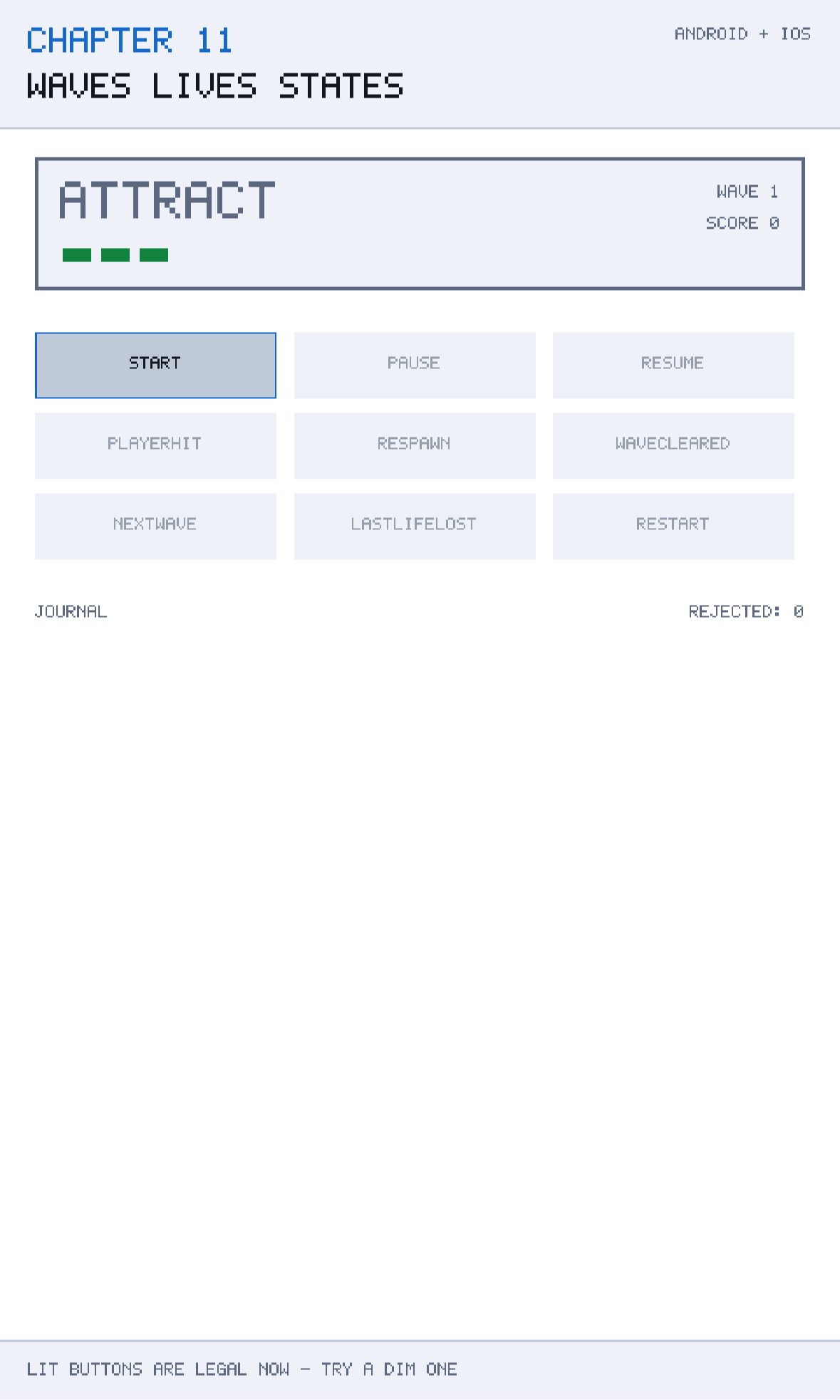
The states and the events
Two enums, and the discipline is in what is not in them:
public enum GameState
{
    Attract,
    Playing,
    Paused,
    LifeLost,
    WaveCleared,
    GameOver,
}

public enum GameEvent
{
    Start,
    Pause,
    Resume,
    PlayerHit,
    Respawn,
    WaveCleared,
    NextWave,
    LastLifeLost,
    Restart,
}
Six states. Not sixty-four. There is no PausedAndDead, because there is no such screen — and because there is no such value, no bug can produce it.
Keeping states and events as separate enums is the part people skip, and it matters. A state is a situation the game is in; an event is something that happened. WaveCleared appears in both, and they are different things: the event is the moment the last alien died, and the state is the celebration screen you sit on afterwards. Merging them produces a design where you cannot express "the wave was cleared but we are still showing the explosion".
The table
The whole machine is one array:
private static readonly (GameState From, GameEvent On, GameState To)[] Table =
[
    (GameState.Attract,     GameEvent.Start,        GameState.Playing),
    (GameState.Playing,     GameEvent.Pause,        GameState.Paused),
    (GameState.Paused,      GameEvent.Resume,       GameState.Playing),
    (GameState.Playing,     GameEvent.PlayerHit,    GameState.LifeLost),
    (GameState.LifeLost,    GameEvent.Respawn,      GameState.Playing),
    (GameState.LifeLost,    GameEvent.LastLifeLost, GameState.GameOver),
    (GameState.Playing,     GameEvent.WaveCleared,  GameState.WaveCleared),
    (GameState.WaveCleared, GameEvent.NextWave,     GameState.Playing),
    (GameState.GameOver,    GameEvent.Restart,      GameState.Attract),
];
Nine rows. That is the entire control flow of the game's structure, and you can read every rule in it in ten seconds — which is the single biggest argument for the technique.
Notice what the table says by omission. There is no row from Paused on PlayerHit, so a player cannot be killed while the game is paused. There is no row from GameOver on Start, so the only way out of game over is Restart. Those are real rules, and in a boolean-flag implementation they would be scattered across a dozen if statements — or, more likely, would not exist at all until somebody reported the bug.
Why a table and not a switch
The obvious alternative is a nested switch:
switch (state)
{
    case GameState.Playing:
        switch (gameEvent)
        {
            case GameEvent.Pause: state = GameState.Paused; break;
            ...
        }
        break;
    ...
}
This is the same information and it works. What it gives up is that the rules are no longer data, and three genuinely useful things become impossible or awkward:
You cannot ask what is legal. With a table it is a one-line query:
/// <summary>The events that are legal right now, which is exactly what the UI should offer.</summary>
public IReadOnlyList<GameEvent> AllowedEvents =>
    Table.Where(entry => entry.From == State).Select(entry => entry.On).ToList();

public bool CanFire(GameEvent gameEvent) =>
    Table.Any(entry => entry.From == State && entry.On == gameEvent);
AllowedEvents is what a menu should be built from. A pause screen that lists exactly the actions the machine will accept cannot offer a button that does nothing — a whole class of UI bug removed by construction.
You cannot validate the machine. With a table you can write a test that walks every state and asserts that each is reachable from Attract and that each has at least one exit. A state with no outgoing transitions is a soft lock, and finding it with a five-line test at build time is much better than finding it in a review.
You cannot draw it. A table can be dumped as a Graphviz file in about ten lines, and a picture of your game's structure is a surprisingly effective way to notice a missing rule.
Test that every state has an exit
Table.Select(t => t.From).Distinct() against Enum.GetValues<GameState>() catches the dead end before a player finds it. This is one of the tests Chapter 21 runs inside the running application.
Firing an event
public bool Fire(GameEvent gameEvent)
{
    foreach ((GameState from, GameEvent on, GameState to) in Table)
    {
        if (from != State || on != gameEvent)
            continue;

        GameState previous = State;
        State = to;
        ApplySideEffects(gameEvent);
        Log($"{previous} -{gameEvent}-> {State}");
        return true;
    }

    RejectedTransitions++;
    Log($"REJECTED {gameEvent} IN {State}");
    return false;
}
Four decisions in twenty lines, and each is worth a sentence.
It returns `bool`. The caller can tell whether anything happened. Silent no-ops are how state machines acquire their reputation for being confusing.
It changes nothing on rejection. No half-applied side effects, no partial transition. Either the whole row applies or none of it does.
Rejections are counted and logged. RejectedTransitions is a number you can put on a debug HUD, and a number that is not zero is a bug — either the UI is offering something it should not, or a system is firing events it has no business firing. Making the illegal case visible rather than merely safe is the difference between a machine that prevents bugs and one that hides them.
The scan is linear. Nine rows, a handful of times a second. If you had four hundred rows and fired events every frame you would build a Dictionary<(GameState, GameEvent), GameState> — but do that when you measure it, not before.
Where the side effects go
A transition is not just a change of state; things happen. Lives are lost, waves advance, scores are awarded. Those live in one place:
private void ApplySideEffects(GameEvent gameEvent)
{
    switch (gameEvent)
    {
        case GameEvent.Start:
        case GameEvent.Restart:
            Lives = StartingLives;
            Wave = 1;
            Score = 0;
            break;

        case GameEvent.PlayerHit:
            Lives--;
            break;

        case GameEvent.WaveCleared:
            Score += 500 * Wave;
            break;

        case GameEvent.NextWave:
            Wave++;
            break;
    }
}
Keyed on the event, not the state. That is deliberate and it is the choice that keeps this readable: "losing a life" is something that happens when the player is hit, not something that happens whenever we happen to be in LifeLost. If you key side effects on the state you have entered, you have to answer "what if we enter it twice?" and "what if we re-enter it from a different direction?", and those questions do not have tidy answers.
Two subtleties are worth pointing out.
Start and Restart share a case, because starting a new run and restarting after game over do exactly the same thing. Sharing the case says that explicitly, rather than duplicating three assignments and letting them drift.
WaveCleared awards 500 * Wave — the score depends on the wave you were on when you cleared it — and NextWave increments the wave afterwards. Getting these in the wrong order pays the player for the wave they are about to start. Ordering side effects is exactly the kind of thing that is invisible in a pile of booleans and obvious in a table.
Driving the interface
The demonstration deliberately shows every event as a button, including the illegal ones, so you can watch rejections happen. A real game would do the opposite:
foreach (GameEvent allowed in machine.AllowedEvents)
    DrawButton(allowed);
The pause screen then shows Resume and nothing else. The game-over screen shows Restart and nothing else. Neither screen has any knowledge of the rules; both are correct by construction, and both stay correct when you add a row to the table.
This is the practical payoff of making the rules data. A switch-based machine forces you to write the menu twice — once as control flow and once as UI — and to keep the two in step by hand.
The journal
The machine keeps its own short history:
private void Log(string entry)
{
    journal.Insert(0, entry.ToUpperInvariant());
    if (journal.Count > 7)
        journal.RemoveAt(journal.Count - 1);
}
Newest first, capped at seven. A bounded, newest-first log is a small thing that pays for itself the first time you get a bug report: the last seven transitions before the freeze tell you far more than the current state does.
In a shipping game this is where you would attach a crash reporter. The state machine's journal, the seed from Chapter 7 and the input log make a reproducible bug report; the state alone makes a guess.
Note Insert(0, ...) is O(n) on a List<T>. For seven entries that is irrelevant. For a thousand-entry log use a ring buffer or a Queue<T> — and if you find yourself keeping a thousand entries, you want a file, which is Chapter 20.
Caveats
Entry and exit actions
This machine has transition actions only. Many designs also want entry and exit actions — start the music when entering Playing, stop it when leaving. You can bolt those on with two more delegate columns in the table, and it stays readable. The trap is doing entry actions and transition actions and then having to remember which runs first; pick one style and stay with it.
Timed transitions
LifeLost should not sit there for ever waiting for a Respawn event; it should show an explosion for a second and then respawn itself. That is a timer that fires an event, and it belongs in the scene rather than in the machine — the machine stays a pure function of events, and the thing that decides when is somebody else's job. Keeping time out of the state machine is what keeps it testable.
Hierarchical states
A pause screen that can itself contain a settings sub-screen is a state machine inside a state, and flattening it produces a combinatorial mess — PausedSettings, PausedSettingsAudio, and so on. At that point you want a stack of machines, or a proper hierarchical state machine. The signal that you have reached it is a table where several rows differ only in a prefix.
One machine per concern
Resist the temptation to put everything in one machine. The run's structure — attract, playing, game over — is one machine. The player's own state — alive, invulnerable, dead — is another. Combining them multiplies the states and reintroduces exactly the combinatorial problem the technique was meant to solve.
Serialising the state
GameState is an enum, so saving it is one integer — Chapter 20 relies on this. Do not save the integer value: enum values shift when somebody inserts a member, and a save file written by version 1.2 will load as the wrong state in 1.3. Save the name, or pin the values explicitly with = 1, = 2.
Building and running this chapter
The solution is src/Chapter11/Chapter11.sln in the book's repository at github.com/nodoid/MonoGameBook/src/Chapter11. It builds and runs entirely on its own; nothing in it depends on any other chapter having been read or built.
Build either head from the chapter folder:
cd src/Chapter11
dotnet build Android/Chapter.Android.csproj
dotnet build iOS/Chapter.iOS.csproj
To deploy to a connected Android device or a running emulator:
dotnet build Android/Chapter.Android.csproj -t:RunTo run on the iOS Simulator without opening an IDE, build for the simulator runtime and install the bundle by hand:
dotnet build iOS/Chapter.iOS.csproj -p:RuntimeIdentifier=iossimulator-arm64
xcrun simctl install booted \
  iOS/bin/Debug/net10.0-ios/iossimulator-arm64/Chapter11.iOS.app
xcrun simctl launch booted com.monogamebook.chapter11
Everything the chapter demonstrates is reachable by touch on the first screen; there are no menus to navigate and nothing to load.
Try it yourself
- From
Attract, firePause. Watch it be rejected, and watch the rejection counter increase. In a boolean implementation this would have paused a game that had not started. - Get to
GameOverand try every event. OnlyRestartworks, and the table is why. - Add a
Quitevent and aQuittingstate, with rows fromPausedandGameOver. Note that no other code changes. - Remove the row
(GameState.GameOver, GameEvent.Restart, GameState.Attract)and reach game over. The game is now soft-locked — this is the dead end the reachability test catches. - Swap the order of the
WaveClearedandNextWaveside effects and play two waves. The scores are now wrong by one wave's worth.
Summary
Boolean flags are a representation problem before they are a bug: four flags describe sixteen situations when the game has five, and the eleven that are nonsense are not prevented by anything. One enum removes the representation, and an explicit table of legal transitions removes the illegal moves between them.
Keeping the table as data rather than as a switch is what makes the technique pay. You can ask which events are legal right now and build the UI from the answer, so a menu can never offer a button that does nothing. You can test that every state is reachable and every state has an exit, which catches soft locks before a player does. And a rejected transition can be counted and logged instead of silently ignored, which turns a whole class of bug into something you can see on a debug HUD.
Side effects belong on the event, not the state, and their ordering matters — scoring the wave before advancing it, not after. The machine keeps a short newest-first journal, and those last few transitions are worth more in a bug report than any amount of current state.
The limits are real and worth knowing. Entry and exit actions need a decision about ordering; timed transitions belong outside the machine so it stays a pure function of events; nested screens want a stack rather than a flattened table; and separate concerns want separate machines, or you have reinvented the combinatorial explosion you were escaping.
Chapter 12 adds the thing that makes all of this structure feel like a game — sound. Not as an afterthought bolted onto the renderer, but driven by the same events the state machine already knows about.