Chapter 4: The Game Loop
Fixed steps, variable draws, and the spiral of death
Every frame, your game is asked two questions: what has changed, and what does it look like now. MonoGame calls those questions Update and Draw, and hands each of them a GameTime. That much is easy. What is not easy — and what quietly breaks a large proportion of first games — is deciding what Update should do with the number inside that GameTime.
Use it directly and your simulation runs at whatever speed the device happens to manage. That is fine for a bouncing ball and disastrous for anything with collisions, acceleration or a scoring rule, because the same input produces different results on a fast phone and a slow one. Ignore it and pretend every frame is the same length, and your game runs at half speed on a device that cannot hit sixty. Neither answer is right on mobile, where the frame rate is genuinely unpredictable: a notification arrives, the GC runs, the display link drops to 30 Hz because the phone is hot, and one frame in a hundred takes a quarter of a second.
The answer that works is to decouple the two questions. Simulate in fixed-size steps so the rules are deterministic; draw as often as you can with whatever time is left over. This chapter builds that mechanism in about forty lines, explains the one piece that everybody leaves out, and then demonstrates the failure mode with the best name in the business — the spiral of death.
What you will learn in this chapter
- What
GameTimeactually contains, and the difference betweenElapsedGameTime,TotalGameTimeandIsRunningSlowly. - Why a variable timestep makes your game non-deterministic, and which bugs that causes.
- How to write a fixed-step accumulator, and how to feed it from MonoGame's variable loop.
- Why the accumulator needs a clamp, and what happens when you leave it out.
- What
Alphais for, and how render interpolation removes the stutter a fixed step can introduce. - How MonoGame's own
IsFixedTimeStepandTargetElapsedTimeinteract with an accumulator of your own. - Mobile-specific timing hazards: variable-refresh displays, thermal throttling, backgrounding and resume.
- The caveats: floating-point drift, GC pauses, and why you must never
Thread.Sleepin a game loop.
The code for this chapter
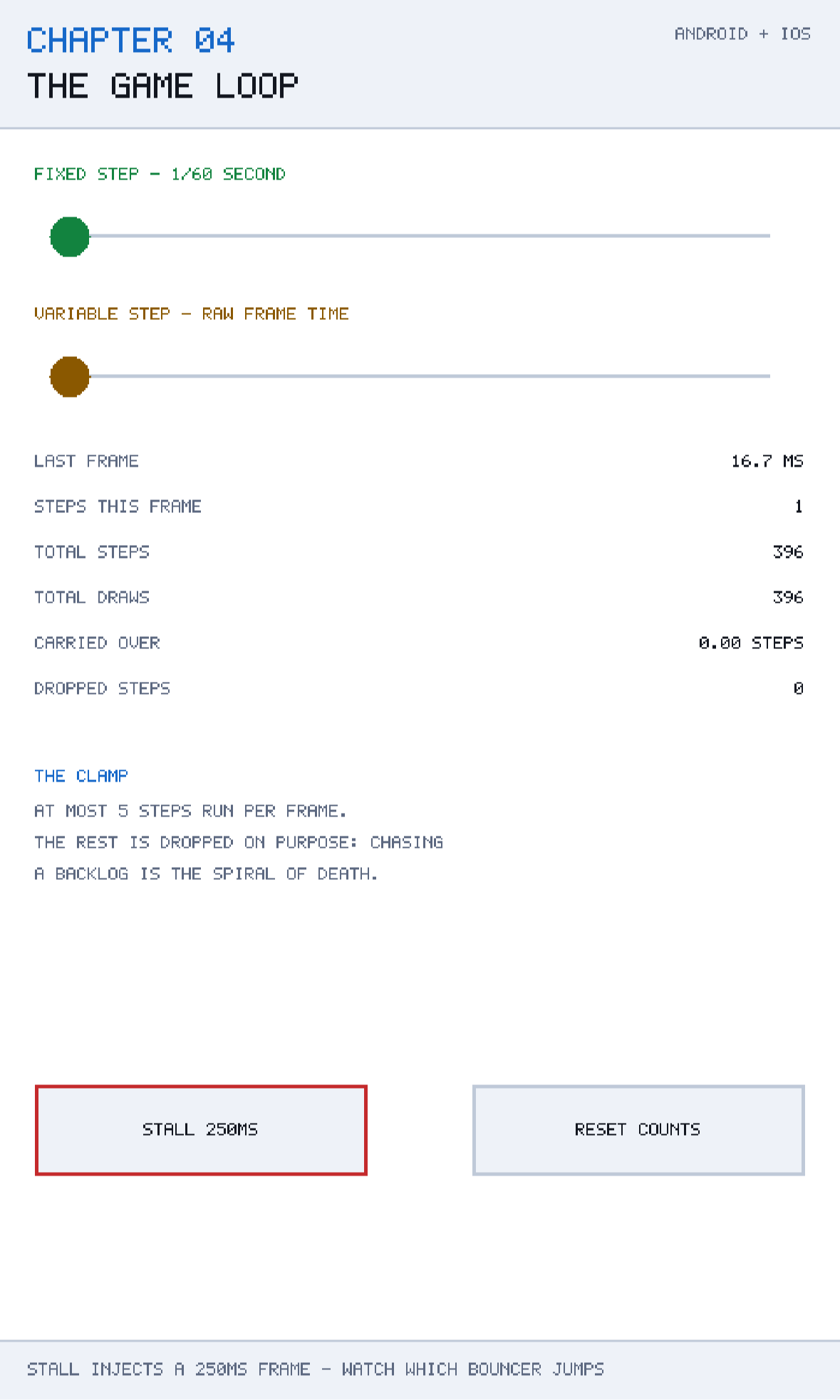
The demonstration is at github.com/nodoid/MonoGameBook/src/Chapter04. It runs the same trivial bouncing value twice — once driven by a fixed-step accumulator, once driven by raw frame time — and gives you a button that injects a 250 millisecond stall into a single frame. Only one of the two bouncers jumps.
What GameTime contains
MonoGame passes a GameTime to both Update and Draw. It has three members worth knowing:
ElapsedGameTime— aTimeSpanfor how long the previous frame took. This is the number your simulation cares about.TotalGameTime— aTimeSpanaccumulating since the game started. Useful for animation phase; dangerous as a simulation clock, because it keeps counting through stalls.IsRunningSlowly—truewhen MonoGame has decided it cannot keep up withTargetElapsedTime. Worth logging; not worth reacting to automatically.
Every scene in this book receives elapsed time as a plain float of seconds, converted once by the host:
scene.Update((float)gameTime.ElapsedGameTime.TotalSeconds, touch);Converting once, at the boundary, is a small thing that pays off. TimeSpan arithmetic inside game code is noisy, and the repeated .TotalSeconds calls hide the fact that everything downstream is really just working in seconds.
The two timesteps, and why the choice matters
Variable timestep
The naive loop uses the frame time directly:
public void Step(float seconds, float minimum, float maximum)
{
    Position += Direction * speed * seconds;
    ...
}
This is not wrong in itself — the demonstration app calls exactly this for the amber bouncer — and for smooth, non-interacting motion it is perfectly adequate. Its problem is that the sequence of positions depends on the sequence of frame times, and the sequence of frame times depends on the device, the thermal state, whether the player got a text message and whether the garbage collector ran.
Three concrete consequences:
- Non-determinism. Two players performing identical inputs get different outcomes. Replays desynchronise, and network lockstep is impossible.
- Tunnelling. A long frame moves a fast object a long way in one go. If it moves further than the object it should have hit is thick, it passes straight through. Chapter 10 is largely about this.
- Instability. Anything with acceleration, damping or springs blows up when handed a large
dt. A gravity term integrated over 250 milliseconds does not resemble the same term integrated over four milliseconds sixty times.
Fixed timestep
The alternative is to simulate only in steps of a constant size, and to run as many whole steps as the elapsed time allows:
public const float StepSeconds = 1f / 60f;

private float accumulated;

public int Advance(float elapsedSeconds)
{
    accumulated += elapsedSeconds;

    int steps = 0;
    while (accumulated >= StepSeconds)
    {
        accumulated -= StepSeconds;
        steps++;
    }

    return steps;
}
The caller then does the same amount of simulation regardless of how long the frame took:
lastSteps = accumulator.Advance(frameSeconds);
for (int step = 0; step < lastSteps; step++)
    fixedBouncer.Step(FixedStepAccumulator.StepSeconds, 0f, 1f);
Every call to Step receives exactly 1/60 of a second. The physics no longer knows or cares how fast the device is. Two devices running the same inputs produce the same state, because they run the same number of identical steps.
The leftover — accumulated, always less than one step — is carried into the next frame. Nothing is lost, and nothing is double-counted.
The fixed-step-with-accumulator pattern is sometimes called the "Gaffer loop", after Glenn Fiedler's article *Fix Your Timestep!*, which is the canonical explanation. The version here is the same idea with the mobile-specific parts made explicit.
The clamp: the part everybody leaves out
The loop above has a bug that only shows up when things go wrong, which is the worst kind. Suppose one frame takes a full second — the app was backgrounded, or the JIT compiled a large method, or the device stalled. accumulated is now 1.0, and the while loop runs sixty simulation steps before returning.
Sixty steps take longer than one frame's worth of budget. So the next frame is also long. Which produces even more accumulated time. Which produces even more steps. The game falls further behind on every frame, the frame rate collapses towards zero, and the device gets hot doing it. That is the spiral of death, and it is the classic failure mode of this pattern.
The fix is to refuse to catch up:
public const int MaxStepsPerFrame = 5;

public int Advance(float elapsedSeconds)
{
    accumulated += elapsedSeconds;

    int steps = 0;
    while (accumulated >= StepSeconds && steps < MaxStepsPerFrame)
    {
        accumulated -= StepSeconds;
        steps++;
    }

    TotalSteps += steps;

    if (accumulated >= StepSeconds)
    {
        // Give up on the backlog rather than chase it for ever.
        DroppedSteps += (long)(accumulated / StepSeconds);
        accumulated = 0f;
    }

    return steps;
}
Two things changed. The while loop now stops after MaxStepsPerFrame, and — crucially — any remaining backlog is discarded rather than carried forward. Discarding is what breaks the feedback loop. The game briefly runs in slow motion relative to wall-clock time, and then it is fine.
DroppedSteps is not there for the algorithm; it is there for you. It is the count of simulated time your game gave up on, and it belongs on your debug HUD. A number that climbs steadily is telling you that your frame budget is genuinely blown, which is Chapter 22's subject.
Choosing the clamp
Five steps at 1/60 is 83 milliseconds of catch-up — roughly what a modest GC pause or a texture upload costs. Setting it much higher recreates the spiral; setting it to 1 makes the game visibly slow down under any hiccup. Between three and eight is the usual range, and it is worth tuning on your slowest target device rather than on your laptop.
Alpha, and the stutter a fixed step introduces
There is a subtlety that this chapter's demonstration deliberately does not hide. Suppose you draw at 60 Hz and simulate at 60 Hz, but the two are not perfectly aligned — say the display gives you 16.9 ms one frame and 15.8 ms the next. Some frames will produce one step and some will produce two, and an object moving at constant speed will appear to move in unequal jumps. On a 120 Hz display the effect is worse: half your frames run no simulation steps at all, and the object simply does not move on those frames.
The accumulator already carries the fix, in the form of the leftover:
/// <summary>Leftover time carried into the next frame, as a fraction of one step.</summary>
public float Alpha => accumulated / StepSeconds;
Alpha is a number between 0 and 1 saying how far between two simulation steps the current instant falls. If you keep both the previous and the current position of a moving object, you can draw it at the interpolated point:
Vector2 drawPosition = Vector2.Lerp(previous, current, accumulator.Alpha);The result is perfectly smooth motion at any refresh rate, from a simulation that still runs in deterministic 1/60 steps. The cost is remembering one extra copy of the position of anything that moves — cheap for a few hundred sprites, and worth it the first time you run your game on a 120 Hz phone.
This book's demonstrations do not interpolate, because interpolating would hide the very stepping the chapter is about. In a real game, interpolate.
MonoGame's own loop
MonoGame has a fixed-step mechanism of its own, and it is on by default:
IsFixedTimeStep = true;                                   // default
TargetElapsedTime = TimeSpan.FromSeconds(1.0 / 60.0);     // default
With these settings, MonoGame tries to call Update exactly sixty times a second, inserting waits if it is running fast and calling Update repeatedly — with IsRunningSlowly set — if it is running behind. That sounds like it makes the accumulator redundant. It does not, for three reasons.
First, MonoGame's catch-up has its own limits and its own behaviour, and it is applied to the whole Update, including your input handling and UI. An accumulator inside your code lets you run the simulation at a fixed rate while input and UI still run once per frame, which is usually what you want.
Second, on mobile you often do not control the callback rate at all. iOS drives the loop from a CADisplayLink tied to the display's refresh rate, which on a ProMotion device varies between 10 and 120 Hz while your game is running. Android's choreographer behaves similarly on high-refresh panels. TargetElapsedTime is a request, not a guarantee.
Third, and most practically: an accumulator you wrote is one you can inspect, test and reason about. FixedStepAccumulator in this chapter's Core has no MonoGame reference at all, which means Chapter 21 can unit-test it by feeding it a synthetic sequence of frame times — including a one-second stall — and asserting on the results. You cannot do that to the engine's internal loop.
A reasonable configuration for mobile
The settings this book's chapters use amount to: let the platform drive the callback rate, and do the fixed stepping yourself.
IsFixedTimeStep = false;              // take frames as they come
graphics.SynchronizeWithVerticalRetrace = true;
Turning IsFixedTimeStep off stops MonoGame from spinning or sleeping to hit a target it may not be able to hit, and leaves the pacing to vsync — which on a phone is the display link, and is exactly the thing you want to be paced by. Your accumulator then converts whatever arrives into whole simulation steps.
If you leave IsFixedTimeStep = true, nothing breaks; the accumulator still works, and will simply see a very regular sequence of 16.67 ms frames most of the time. The demonstration in this chapter runs with MonoGame's defaults for exactly that reason: it makes the injected stall stand out against an otherwise steady background.
Seeing it fail on purpose
The demonstration's stall button does not really stall the device. It adds 250 milliseconds to the frame time reported to the loop, which is a much more convenient way to reproduce the effect:
// A stall is simulated by handing the loop a frame time it never really had.
float frameSeconds = elapsedSeconds + pendingStall;
pendingStall = 0f;
lastFrameSeconds = frameSeconds;

lastSteps = accumulator.Advance(frameSeconds);
for (int step = 0; step < lastSteps; step++)
    fixedBouncer.Step(FixedStepAccumulator.StepSeconds, 0f, 1f);

variableBouncer.Step(frameSeconds, 0f, 1f);
Press it and watch the two tracks. The amber marker — raw frame time — jumps a visible distance across the screen in a single frame, because 250 ms at 220 units per second is 55 units of travel applied at once. In a real game that is a bullet passing through a wall.
The green marker moves by exactly five steps' worth, because the clamp allowed five and dropped the rest. The DROPPED STEPS counter goes up by ten. The game has honestly lost a sixth of a second of simulated time, and it has done so in a controlled way that cannot compound.
That is the whole trade being made, and it is worth stating plainly: under stall, a fixed-step game loses time rather than losing stability. For a single-player mobile game that is almost always the right trade.
Mobile-specific hazards
Backgrounding and resume
When the player takes a call, your game stops receiving frames. When it comes back, the first ElapsedGameTime may be enormous — or may be small, depending on the platform's bookkeeping. Either way, the frame after a resume is the single most likely place for a spiral to start. The clamp handles it. Without a clamp, a two-minute phone call produces 7,200 queued simulation steps and an application that appears to have hung.
It is worth going further and resetting the accumulator explicitly on resume, which MonoGame surfaces through the Activated event:
Activated += (_, _) => accumulator.Reset();Variable refresh rate
A ProMotion iPhone or a 120 Hz Android panel does not run at a constant rate. It runs at whatever the system decides, and the system decides based on content, battery and temperature. Any code of the form "this animation takes 30 frames" is a bug on those devices. Express durations in seconds, always.
Thermal throttling
After several minutes of sustained load a phone reduces its clocks. Frame times lengthen gradually rather than suddenly, which means you get more frames that produce two steps instead of one, and eventually frames that hit the clamp. A DroppedSteps counter that is zero for five minutes and then climbs is a thermal problem, not a logic one. Chapter 22 shows how to measure that properly.
Garbage collection
A gen-0 collection on a phone is sub-millisecond and invisible. A gen-2 collection with a large heap is tens of milliseconds and very visible. The loop cannot prevent this; the fix is to stop allocating per frame, which is again Chapter 22's territory. What the loop can do is survive it, which is what the clamp is for.
Caveats
Floating-point drift
accumulated -= StepSeconds accumulates rounding error over hours of play. With float and a 1/60 step the drift is on the order of a millisecond per hour — irrelevant for a game, fatal for a lockstep multiplayer simulation. If you need bit-exact determinism across devices, accumulate in long ticks rather than float seconds, and consider fixed-point arithmetic for the simulation itself.
Never sleep in the loop
It is tempting to add Thread.Sleep(1) to "give the CPU a rest". Do not. Sleep has millisecond-scale granularity that varies by platform, it does not release the frame in a way the display link understands, and on mobile it can cause the OS to mis-schedule your next frame entirely. Pacing is the display's job; let vsync do it.
Do not update from Draw
Draw may be called at a different rate from Update, may be skipped entirely when the game is running slowly, and on some platforms is not called at all while the app is occluded. Any state change made in Draw will therefore happen an unpredictable number of times. Keep Draw free of side effects — this is the discipline that lets you add render interpolation later without discovering that half your game logic lives in the renderer.
The first frame is a lie
The first ElapsedGameTime after startup is frequently large and meaningless, because it spans device creation, content loading and JIT. Discard it, or reset the accumulator at the end of LoadContent.
Building and running this chapter
The solution is src/Chapter04/Chapter04.sln in the book's repository at github.com/nodoid/MonoGameBook/src/Chapter04. It builds and runs entirely on its own; nothing in it depends on any other chapter having been read or built.
Build either head from the chapter folder:
cd src/Chapter04
dotnet build Android/Chapter.Android.csproj
dotnet build iOS/Chapter.iOS.csproj
To deploy to a connected Android device or a running emulator:
dotnet build Android/Chapter.Android.csproj -t:RunTo run on the iOS Simulator without opening an IDE, build for the simulator runtime and install the bundle by hand:
dotnet build iOS/Chapter.iOS.csproj -p:RuntimeIdentifier=iossimulator-arm64
xcrun simctl install booted \
  iOS/bin/Debug/net10.0-ios/iossimulator-arm64/Chapter04.iOS.app
xcrun simctl launch booted com.monogamebook.chapter04
Everything the chapter demonstrates is reachable by touch on the first screen; there are no menus to navigate and nothing to load.
Try it yourself
- Set
MaxStepsPerFrameto1000and press STALL. Watch the frame time counter climb. This is the spiral of death; you have to kill the app to stop it. - Set
MaxStepsPerFrameto1and press STALL. Note that nothing dramatic happens — the game simply loses more time. Decide which failure you would rather ship. - Add a
previousPositionfield toBouncer, and draw the fixed marker atMathHelper.Lerp(previous, current, accumulator.Alpha). The stepping disappears. - Change
StepSecondsto1f / 30fand press STALL. A larger step is cheaper and coarser; look at what it does to the bounce position at the ends of the track. - Log
gameTime.IsRunningSlowlyfor a minute of normal play on a device, then during a screen recording. Screen recording is a reliable way to make a phone run slowly on demand.
Summary
The loop is where determinism is won or lost. Feeding raw frame time into your simulation ties the behaviour of your game to the hardware it happens to be running on, and produces three specific bugs — non-determinism, tunnelling and instability — that are painful to diagnose later because they only appear under load.
A fixed-step accumulator fixes all three by converting whatever elapsed time arrives into a whole number of identical simulation steps, carrying the remainder forward. Forty lines, no framework dependency, unit-testable. The piece that is easy to omit is the clamp: without a limit on steps per frame, and without discarding the backlog beyond that limit, one long frame compounds into a game that never recovers. DroppedSteps is the honest record of what the clamp gave up.
Drawing stays variable. Alpha — the leftover fraction of a step — lets you interpolate between the last two simulated states so that motion is smooth on a 120 Hz display even though the simulation runs at 60. Draw must have no side effects for that to be possible.
Mobile adds its own hazards: variable-refresh displays, thermal throttling, and the resume after a phone call that will start a spiral in any loop that lacks a clamp. All of them are survivable with the mechanism in this chapter, and none of them are survivable without it.
Chapter 5 turns from time to space, and asks the equivalent question about the screen: how do you lay out a game once, in one coordinate system, and have it be correct on a small phone, a tall phone and a tablet?