Chapter 3: The Content Pipeline
From a source file to a loadable asset
Content.Load<Texture2D>("ship") does not read ship.png. It reads Content/ship.xnb, a binary file produced at build time by a separate compiler that ran before your game did. Almost every content problem a beginner hits — the asset that works on desktop and throws on the phone, the texture that is present in the folder and missing at runtime, the font that will not load on a Mac but loads fine on Windows — comes from not knowing that sentence.
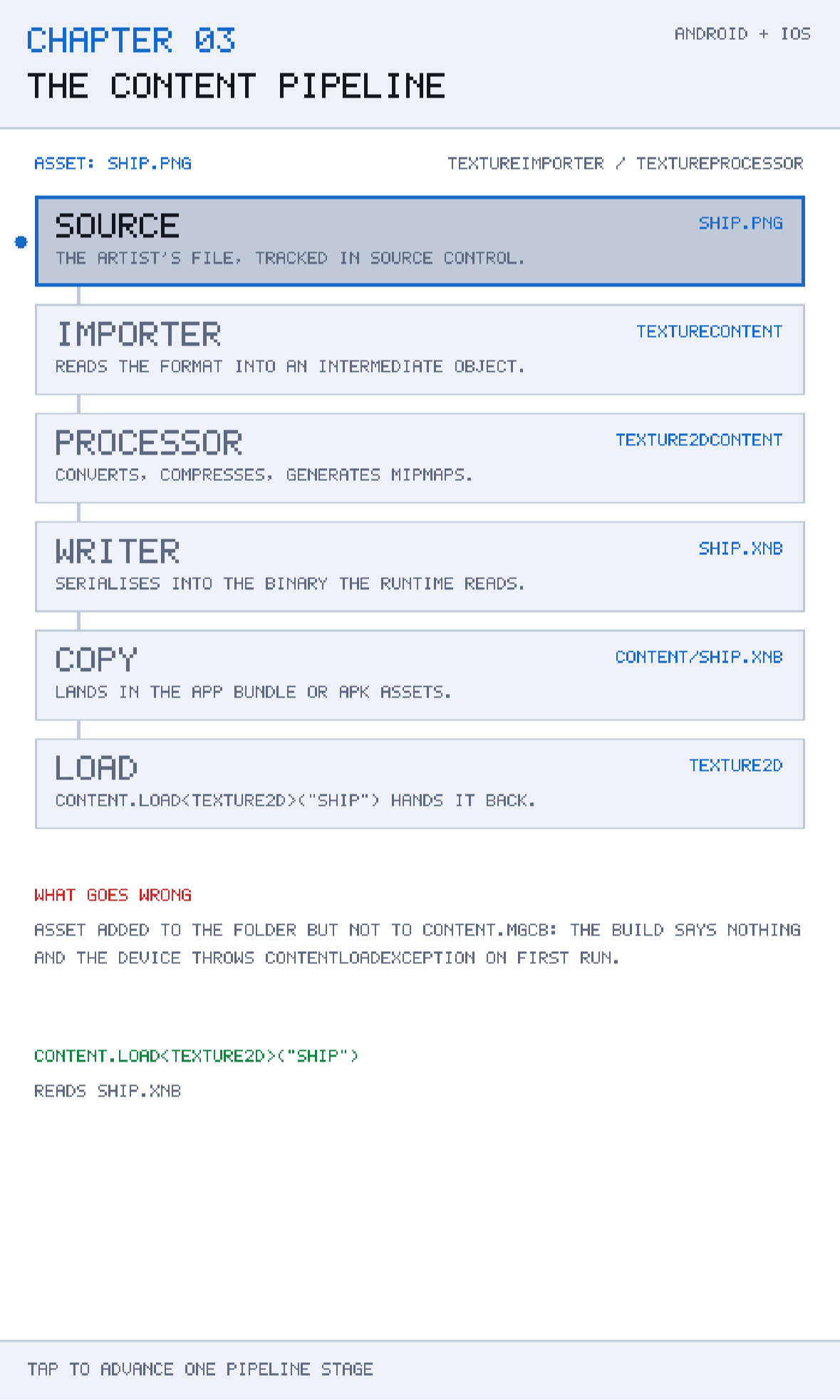
This chapter takes one asset and walks it down the pipeline, stage by stage, so you can see it change shape: a file on disk becomes an intermediate object, then a processed object, then a binary, then an entry in the application package, and finally a live Texture2D in memory. Once the shape changes are visible, the failure modes stop being mysterious. They are almost all "the asset never entered the pipeline" or "the asset entered the pipeline for the wrong platform".
The chapter also covers the exception: there are good reasons to go around the pipeline entirely for some file types, and this book does exactly that in Chapter 12. Knowing when the pipeline earns its cost — and when it is pure ceremony — is as useful as knowing how it works.
What you will learn in this chapter
- What the MonoGame Content Builder (MGCB) actually does, and why a game needs a build step for art at all.
- The six stages an asset passes through, and what it looks like after each one.
- How
Content.mgcbworks, what an importer and a processor are, and how to choose them. - Where compiled content ends up inside an Android APK and inside an iOS
.appbundle. - When to skip the pipeline and load a raw file with
TitleContainer, and what you give up by doing so. - The specific failure that costs beginners the most time — and how to make it impossible.
- The caveats: platform profiles, case sensitivity, tool installation, and content builds on CI.
The code for this chapter
The demonstration is at github.com/nodoid/MonoGameBook/src/Chapter03. Tapping the screen advances one stage; reaching the end starts the next asset. Three assets are modelled — a texture, a sound and a font — because the three take visibly different routes through the same machinery.
The stages themselves are a plain list in Core, with no MonoGame reference in sight:
public sealed record PipelineStage(
    string Name, string Produces, string Explanation);

public static IReadOnlyList<PipelineStage> Stages { get; } =
[
    new PipelineStage("SOURCE",    "ship.png",
        "The artist's file, tracked in source control."),
    new PipelineStage("IMPORTER",  "TextureContent",
        "Reads the format into an intermediate object."),
    new PipelineStage("PROCESSOR", "Texture2DContent",
        "Converts, compresses, generates mipmaps."),
    new PipelineStage("WRITER",    "ship.xnb",
        "Serialises into the binary the runtime reads."),
    new PipelineStage("COPY",      "Content/ship.xnb",
        "Lands in the app bundle or APK assets."),
    new PipelineStage("LOAD",      "Texture2D",
        "Content.Load<Texture2D>(\"ship\") hands it back."),
];
Why a content pipeline exists at all
It is fair to ask why a game cannot simply open ship.png and decode it. Plenty of engines do. The answer is that a build step buys three things that matter more on a phone than anywhere else.
Runtime cost moves to build time
Decoding a PNG means running an inflate pass and an unfiltering pass over every scanline, on the device, while the player waits at a loading screen. An .xnb holds the pixels in a layout the GPU can consume more or less directly. You pay the conversion once, on your machine, instead of once per launch on every player's phone.
Platform-specific compression becomes possible
This is the big one for mobile. GPUs want compressed textures, and they do not agree on the format: Android devices generally want ETC2, Apple's GPUs want ASTC or PVRTC, desktop GL wants DXT. A single source PNG can be built into a different compressed format per platform, from the same Content.mgcb, because the processor is told which platform it is building for. Without a pipeline you would either ship uncompressed textures — three to six times the memory — or maintain three sets of art by hand.
Errors move left
A missing font glyph, an unsupported WAV encoding or a texture whose dimensions the target cannot handle become build errors on your machine, not ContentLoadExceptions on a player's device. That is worth a great deal, and it is also the source of the pipeline's main frustration: things it does not check remain silent until runtime.
The pipeline is inherited from XNA, which is why the compiled extension is .xnb — "XNA Binary". MonoGame kept the format so that the enormous body of existing XNA content and tooling still works. The tool that runs it is mgcb, the MonoGame Content Builder, and the GUI wrapper is the MGCB Editor.
The six stages, one at a time
Source
The artist's file, exactly as it comes out of the tool: ship.png, laser.wav, hud.spritefont. This is the file you commit to source control. It is never shipped, and it is never read by your game.
Keeping sources in the repository next to the .mgcb matters more than it looks. If your compiled .xnb files are what you commit and the sources live on somebody's desktop, then in a year you will have art you cannot change.
Importer
The importer's only job is to read a file format into an in-memory intermediate. TextureImporter turns any image format it recognises into a TextureContent. WavImporter turns a RIFF WAV into an AudioContent. FontDescriptionImporter reads a .spritefont XML file — which is a description, not a font — into a FontDescription.
Importers are chosen by file extension by default, and you can override the choice per asset. The reason to override is usually that you want a different downstream shape: importing a PNG with TextureImporter gives you a texture, but a font atlas PNG might be better imported and processed as a sprite font.
Processor
The processor is where the work happens, and where nearly all the useful options live. TextureProcessor alone controls:
- whether the texture is premultiplied (
ColorKeyEnabled,PremultiplyAlpha), - whether mipmaps are generated (
GenerateMipmaps), - what compressed format the output uses (
TextureFormat), - whether the image is resized to a power of two (
ResizeToPowerOfTwo).
PremultiplyAlpha deserves a sentence on its own, because it is the most common source of "why does my sprite have a dark halo?". MonoGame's default SpriteBatch blend state is BlendState.AlphaBlend, which expects premultiplied colour. The processor premultiplies by default, so things generally work — until you load a texture some other way and forget, at which point every semi-transparent edge picks up a dark fringe.
The same rule applies to colours you build in code rather than load from a file, and it catches people just as often. A translucent overlay written as new Color(18, 131, 63, 60) is not premultiplied: the blend adds the full-strength colour on top of most of the background, so on a light background the overlay barely shows and on a dark one it glows. Scale the components by the same fraction as the alpha and it behaves — which in MonoGame is one multiply, because Color * float scales all four channels at once:
// A 24% green wash, premultiplied, so it tints rather than glows.
renderer.Fill(bounds, Palette.Good * 0.24f);
Chapters 8, 10 and 14 all draw overlays this way, and it is the reason they look the same against any background colour.
Writer
The writer serialises the processed object into the .xnb binary. You almost never touch this stage unless you are writing a custom content type, in which case you write a matching ContentTypeWriter and ContentTypeReader pair.
One thing worth knowing: .xnb is versioned, and it embeds the target platform. An .xnb built for DesktopGL will not load on Android. This is by design and it is the mechanism behind one of the caveats below.
Copy
The compiled .xnb is copied into the application package. Where it lands differs by platform, and the difference is invisible from your code but very visible when something goes wrong:
| Platform | Content lives in | Reached by |
|---|---|---|
| Android | APK assets/Content/ | Android AssetManager |
| iOS | .app bundle, Content/ folder | Bundle-relative file path |
| DesktopGL | Alongside the executable | Ordinary file path |
MonoGame hides all three behind Content.RootDirectory, which every chapter in this book sets in the game's constructor:
Content.RootDirectory = "Content";Load
Finally, Content.Load<T>("name") finds Content/name.xnb, reads it with the reader matching its type, and returns the live object. Note that the asset name has no extension — the pipeline strips it. That is modelled in Core as a computed property, which is the kind of small thing worth putting in a rules project so it cannot drift:
public string AssetName => SourceFile[..SourceFile.LastIndexOf('.')];

public string CompiledFile => AssetName + ".xnb";
ContentManager caches by asset name, so calling Load twice for the same asset returns the same instance. That also means Content.Unload() disposes everything it handed out — if you have kept a reference to a texture past an unload, you will get an ObjectDisposedException at draw time.
Content.mgcb: the file that actually decides
The .mgcb file is a plain-text list of build settings followed by one block per asset. Here is a realistic fragment:
#----------------------------- Global Properties ---------------------------#

/outputDir:bin/$(Platform)
/intermediateDir:obj/$(Platform)
/platform:Android
/config:
/profile:Reach
/compress:True

#-------------------------------- References -------------------------------#


#---------------------------------- Content --------------------------------#

#begin ship.png
/importer:TextureImporter
/processor:TextureProcessor
/processorParam:ColorKeyEnabled=False
/processorParam:GenerateMipmaps=False
/processorParam:PremultiplyAlpha=True
/processorParam:TextureFormat=Compressed
/build:ship.png

#begin laser.wav
/importer:WavImporter
/processor:SoundEffectProcessor
/processorParam:Quality=Best
/build:laser.wav
Read that carefully, because the single most expensive beginner mistake in MonoGame lives in this file. Look at the last line of each block: /build:ship.png. An asset that is not listed here is not built. Dropping a PNG into the Content folder does nothing at all. The build succeeds, says nothing, and the device throws ContentLoadException: The content file was not found the first time you run the scene that needs it.
That is exactly the failure the chapter's Core calls out by name:
public const string CommonFailure =
    "Asset added to the folder but not to Content.mgcb: the build says " +
    "nothing and the device throws ContentLoadException on first run.";
Make the failure impossible
Never add an asset by copying it into the folder. Always add it through the MGCB Editor, or by editing Content.mgcb by hand and then copying the file. If you build content on CI, add a step that fails when the number of /build: lines does not match the number of source files in the folder — ten lines of script that will save you a release.
Installing and running the editor
The MGCB Editor is a .NET tool, installed once per machine:
dotnet tool install -g dotnet-mgcb-editor
mgcb-editor-mac      # or mgcb-editor-windows / mgcb-editor-linux
On a project that references MonoGame.Content.Builder.Task, the content build runs automatically as part of dotnet build. Without that package reference, Content.mgcb is an inert text file — a genuinely confusing state to be in, because everything looks correct and nothing is produced.
You can also run the builder directly, which is what you want on CI:
dotnet mgcb /@:Content/Content.mgcb /platform:AndroidThe other route: going around the pipeline
The pipeline is not compulsory. Anything you can open as a stream, you can load yourself, and MonoGame gives you a platform-neutral way to open files that ship with your application:
using Stream stream = TitleContainer.OpenStream("Content/laser.wav");
SoundEffect effect = SoundEffect.FromStream(stream);
TitleContainer.OpenStream resolves a bundle-relative path on every platform — inside the APK's assets on Android, inside the .app on iOS, next to the executable on desktop. That single call is why this book's one content-carrying chapter, Chapter 12, ships seven plain .wav files and no .mgcb at all.
The trade-offs are worth stating plainly.
- You give up compression and platform-specific formats. For a handful of short WAVs that is nothing. For a hundred textures it is unacceptable.
- You give up build-time validation. A malformed file is now a runtime exception.
- You gain a comprehensible build. No tool to install, no
.mgcbto keep in sync, no "why is the content not being copied" afternoon. - You must mark the files for copying yourself, with
AndroidAsseton Android andBundleResourceon iOS.
That last point is the practical cost, and it looks like this in the two heads:
<!-- Android head -->
<ItemGroup>
  <AndroidAsset Include="..\Content\*.wav" Link="Content\%(Filename)%(Extension)" />
</ItemGroup>

<!-- iOS head -->
<ItemGroup>
  <BundleResource Include="..\Content\*.wav" Link="Content\%(Filename)%(Extension)" />
</ItemGroup>
For textures, the same reasoning applies with Texture2D.FromStream. It works, it is convenient during prototyping, and it will cost you memory and load time in a shipping build. Use the pipeline for art; use TitleContainer for the handful of small files where the pipeline is more trouble than it is worth.
The third route: no content at all
This book takes a more extreme position for its own demonstrations. Every chapter draws text from a built-in 5 × 7 pixel font defined in code, and every sprite is a rectangle drawn from a one-pixel white texture created at runtime:
pixel = new Texture2D(device, 1, 1);
pixel.SetData([Color.White]);
Twenty-four of the twenty-five chapters therefore have no Content folder, no .mgcb, and nothing to build before the first run. That is a deliberate choice for teaching material — it means a reader can clone the repository and run any chapter immediately — and it is emphatically not a recommendation for a real game. A real game needs a real pipeline. Knowing that you can draw a complete interface from one white pixel is, however, genuinely useful when you are prototyping.
Caveats
Content is built per platform
/platform:Android in the .mgcb is not decoration. An .xnb built for one platform will not load on another, and the error message — Bad XNB magic or a version mismatch — does not say "wrong platform". If you keep one Content.mgcb and build it for several heads, make sure $(Platform) in outputDir really does vary, or the second build will overwrite the first and you will ship Android content in your iOS bundle.
Case sensitivity
Content.Load<Texture2D>("Ship") and Content.Load<Texture2D>("ship") are the same asset on Windows and macOS, and different assets on Android. This is the classic "works on my machine" bug in mobile MonoGame. Pick lower-case asset names and never deviate.
Reach and HiDef profiles
The /profile: setting limits what the content build will accept. Reach caps texture sizes and forbids some formats, matching what older and lower-end GPUs support; HiDef lifts those limits. For mobile, Reach is the safe default and the one this book assumes. Switching to HiDef for a large texture is a decision to drop the bottom of the device market, and it should be made knowingly.
SpriteFont on non-Windows machines
.spritefont files reference a font by name, and the builder has to find that font on the build machine. Arial exists on Windows, not necessarily on a Linux CI agent. If your content build works locally and fails on CI with a font error, that is why; ship the .ttf alongside the .spritefont and reference it by file.
Content build failures can be quiet
A failed content build does not always fail the outer dotnet build. Read the build log for mgcb output the first time you add content to a project, and confirm the .xnb files exist on disk before you go looking for bugs in your loading code.
Building and running this chapter
The solution is src/Chapter03/Chapter03.sln in the book's repository at github.com/nodoid/MonoGameBook/src/Chapter03. It builds and runs entirely on its own; nothing in it depends on any other chapter having been read or built.
Build either head from the chapter folder:
cd src/Chapter03
dotnet build Android/Chapter.Android.csproj
dotnet build iOS/Chapter.iOS.csproj
To deploy to a connected Android device or a running emulator:
dotnet build Android/Chapter.Android.csproj -t:RunTo run on the iOS Simulator without opening an IDE, build for the simulator runtime and install the bundle by hand:
dotnet build iOS/Chapter.iOS.csproj -p:RuntimeIdentifier=iossimulator-arm64
xcrun simctl install booted \
  iOS/bin/Debug/net10.0-ios/iossimulator-arm64/Chapter03.iOS.app
xcrun simctl launch booted com.monogamebook.chapter03
Everything the chapter demonstrates is reachable by touch on the first screen; there are no menus to navigate and nothing to load.
Try it yourself
- Run the chapter app and tap through all three assets. Note that the font takes the same six stages as the texture, but produces a completely different runtime type.
- Add a fourth
ContentAssetformusic.mp3withMp3ImporterandSongProcessor, producing aSong. Rebuild and step through it. - In a scratch project, add a PNG to the
Contentfolder without adding it toContent.mgcb, then callContent.Loadon it. Read the exception carefully — it is the one you will meet most often. - Load the same PNG through
TitleContainer.OpenStreamandTexture2D.FromStreaminstead. Compare the file size in the package and the time taken to load.
Summary
The pipeline exists because a phone is not a good place to decode a PNG, because mobile GPUs disagree about texture compression, and because a build error on your machine is worth ten crash reports from players. What it produces is an .xnb: a platform-specific, versioned binary that Content.Load reads by name, without an extension, from Content.RootDirectory.
Six stages take an asset there. Source, importer, processor, writer, copy, load — and of those, the processor is where the decisions are and the copy stage is where the platforms differ. Everything your game sees is the last stage, which is exactly why the earlier ones are worth being able to picture.
The pitfall to internalise is the quiet one: a file in the Content folder that is not in Content.mgcb does not exist as far as the build is concerned, and you will not find out until the device throws. Add assets through the editor, keep asset names lower-case, and build content per platform.
And know the escape hatch. TitleContainer.OpenStream loads any file that ships with your application, on every platform, with no build step at all. It is the right tool for a handful of small files — as Chapter 12 will demonstrate with seven sound effects — and the wrong tool for a hundred textures.
Chapter 4 leaves assets behind and goes to the heart of the runtime: the game loop, the difference between a fixed and a variable time step, and the failure mode with the best name in game development — the spiral of death.