Chapter 15: The Board Model
81 cells, and the arithmetic that makes them a grid
This chapter starts the book's second game. The first half built an arcade shooter, where the interesting problems were about time — frame rates, movement, collisions between things that are moving fast. A Sudoku has none of that. Nothing moves, nothing is timed, and the frame rate is irrelevant. What it has instead is structure, and a great deal of it: nine rows, nine columns, nine boxes, eighty-one cells, and a set of relationships between them that has to be correct in every direction or nothing else in the next four chapters will work.
It is tempting to skip past the data model to the interesting parts — validation, generation, solving. Do not. Every one of those chapters is short and readable precisely because this one gets the indexing right, and a board model with a subtly wrong box calculation produces a solver that fails on one puzzle in fifty and cannot be debugged.
So this chapter is about a single array of eighty-one integers, three functions of an index, and a small number of decisions about mutability that turn out to matter enormously by Chapter 19.
What you will learn in this chapter
- Why a flat 81-element array beats a 9 × 9 jagged array, and what it buys.
- The three index functions — row, column and box — and how the box calculation works.
- Why zero is a good sentinel for "empty" here, when it usually is not.
- The difference between a given and an entry, and why the board enforces it.
- Why the board has both
SetandForce, and who is allowed to call each. - A text format for a board that is readable, greppable and one line long.
- The caveats: cloning cost,
FilledCountallocating, and the limits of a fixed 9 × 9.
The code for this chapter
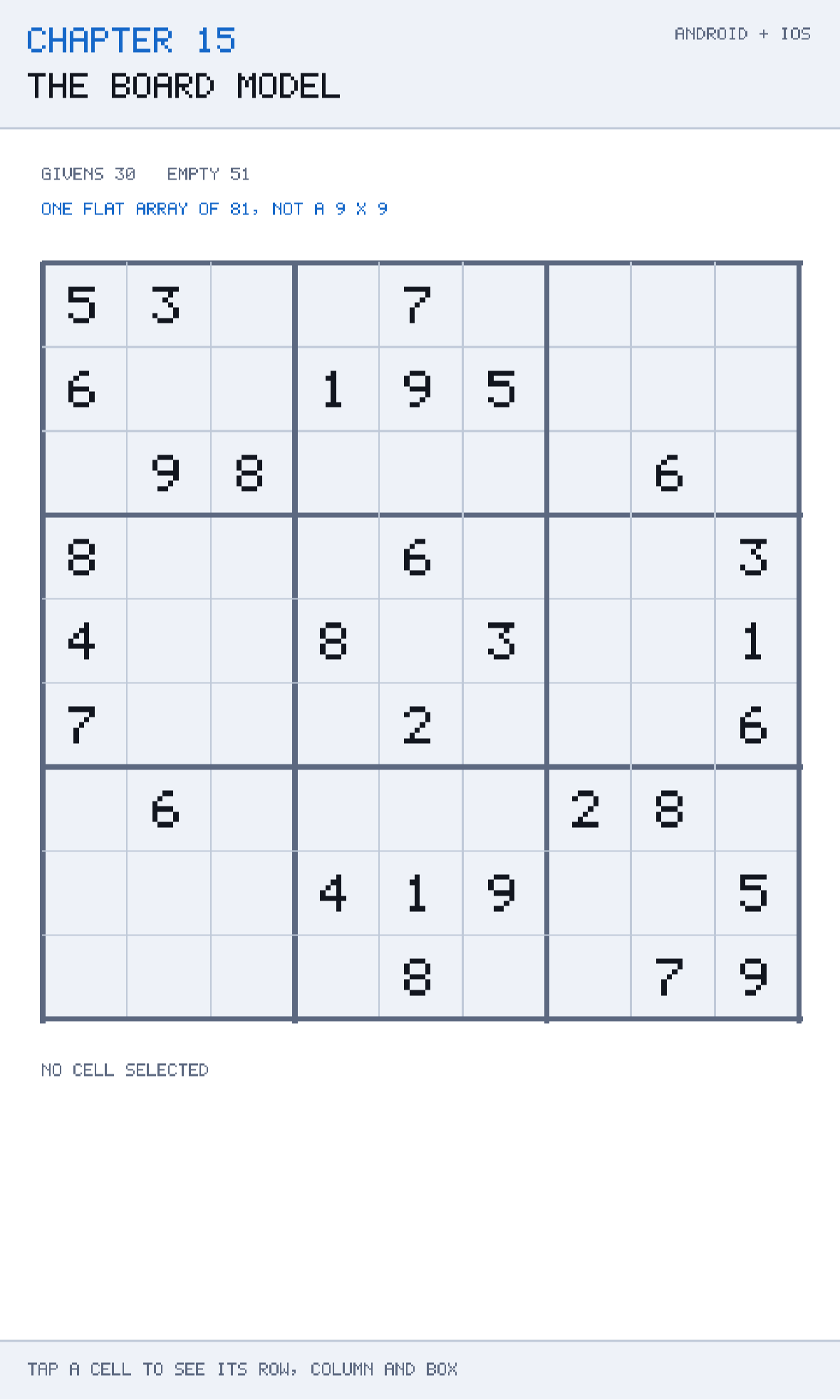
The demonstration is at github.com/nodoid/MonoGameBook/src/Chapter15. Tap any cell and it shows you the index arithmetic for that cell: its flat index, the row and column that index decodes to, the box it falls in, and the eight cells sharing each of those.
One array, not nine
The board's entire state is two flat arrays:
public const int Size = 9;
public const int BoxSize = 3;
public const int CellCount = Size * Size;

private readonly int[] values = new int[CellCount];
private readonly bool[] givens = new bool[CellCount];
Not int[9][], not int[9,9]. The class comment gives the reason:
The board is stored as one flat array of 81 cells rather than a jagged 9 × 9, because every interesting question — what is in this row, this column, this box — turns out to be arithmetic on a single index, and because one array is one allocation.
Both halves are real.
One allocation. A jagged int[9][] is ten allocations: the outer array plus nine inner ones, each with its own object header, scattered across the heap. Cloning it — which Chapter 17's generator does thousands of times — means ten allocations each time. A flat array is one Array.Copy into one block.
Arithmetic, not iteration. The important operations on a Sudoku are "give me the peers of this cell". With a flat index those are index calculations. With a two-dimensional structure you are constantly converting between (row, column) pairs and back, and every function needs two parameters instead of one.
There is a third benefit that appears in Chapter 19: a flat array serialises to a string of eighty-one characters, which makes save files, test fixtures and debug output trivial.
A note on int[9,9]
C#'s rectangular arrays — int[9,9] — are one allocation and are contiguous, so they avoid the first objection. They are still worse here for two reasons: indexing them is marginally slower than a single-dimensional array because the bounds check is two-dimensional, and, more importantly, they cannot be treated as a flat sequence without Buffer.BlockCopy gymnastics. Being able to say values[index] for any of the eighty-one cells, in any order, is what makes the solver in Chapter 19 short.
The three functions
Everything structural about a Sudoku is these three lines:
public static int IndexOf(int row, int column) => row * Size + column;

public static int RowOf(int index) => index / Size;

public static int ColumnOf(int index) => index % Size;
IndexOf is row-major layout: row 0 occupies indices 0–8, row 1 occupies 9–17, and so on. RowOf and ColumnOf are its inverse, obtained by integer division and remainder. If you have never internalised this pairing, it is worth doing so — it is the same arithmetic behind every tile map, every image buffer and every two-dimensional array in any language.
The fourth function is the one worth walking through slowly:
/// <summary>Box number 0-8, reading left to right then top to bottom.</summary>
public static int BoxOf(int index) =>
    RowOf(index) / BoxSize * BoxSize + ColumnOf(index) / BoxSize;
Take it in two pieces.
RowOf(index) / BoxSize maps rows 0–2 to 0, rows 3–5 to 1 and rows 6–8 to 2. That is the band — which horizontal third of the grid the cell is in. Multiplying by BoxSize turns bands 0, 1, 2 into 0, 3, 6, which are the first box numbers of each band.
ColumnOf(index) / BoxSize does the same for columns, giving the stack — which vertical third — as 0, 1 or 2.
Add them and you get the box number, 0 to 8, reading left to right then top to bottom. Cell 40 — the centre of the board — is row 4, column 4; band 1, stack 1; box 1 × 3 + 1 = 4, the middle box. Cell 80 is row 8, column 8, box 2 × 3 + 2 = 8.
Verify this by hand, once
Write out BoxOf for indices 0, 8, 9, 20, 40, 60, 72 and 80 on paper before you trust it. Every Sudoku bug that is not a typo is a wrong box calculation, and they are almost impossible to spot by reading, because a wrong version still produces plausible-looking groups of nine.
The demonstration app exists mainly to let you do that verification by tapping instead of by hand.
Zero as empty
values[index] == 0 means the cell is empty. In most code a magic sentinel is a poor idea — Chapter 8 used float? rather than −1 for exactly that reason — so it is worth being explicit about why it is a good idea here.
The legal values are 1 to 9. Zero is not merely unused; it is outside the domain, and it is the natural additive identity, so a default-initialised int[81] is already a correctly empty board with no initialisation pass. An int?[81] would be eight bytes per cell instead of four, would allocate differently, and would force a null check at every one of the several thousand reads the solver performs per puzzle.
The rule to follow is: a sentinel is acceptable when the domain genuinely excludes it and the type's default value is the sentinel. Both hold here, and neither held for the ship's target position.
Givens and entries
A Sudoku has two kinds of filled cell: clues that came with the puzzle and cannot be changed, and the player's own entries, which can. The board tracks that with a parallel bool[] and enforces it in the setter:
/// <summary>Writes a value. Returns false if the cell is a clue, which is never editable.</summary>
public bool Set(int index, int value)
{
    if (givens[index])
        return false;

    values[index] = Math.Clamp(value, 0, Size);
    return true;
}
Three things are being done at once, and all three belong here rather than in the caller.
The given check. Every path that changes a cell goes through Set, so there is exactly one place that can permit editing a clue. A UI that checks IsGiven before calling is being polite; the board is being safe.
The clamp. Math.Clamp(value, 0, Size) means no code path anywhere can put a 10 or a −1 into the array. Validating at the boundary means everything downstream — the renderer, the solver, the serialiser — can assume the invariant.
The `bool` return. The caller can tell whether the write happened, which is what the UI needs in order to give feedback ("that cell is a clue") rather than silently doing nothing.
Force, and who may call it
/// <summary>Writes a value ignoring the given flag. For generators and solvers only.</summary>
public void Force(int index, int value) => values[index] = value;
Generators and solvers need to write anywhere, including over clues — the generator in Chapter 17 fills a complete solution and then decides which cells become clues, and the solver in Chapter 19 works on a scratch copy. Making them go through Set would mean the given flags fight them.
The honest way to handle this is a second, clearly-named method with a comment saying who may use it. The alternative — making Set take a bool force parameter — produces call sites reading Set(index, value, true) where the true means nothing to a reader. A named method is documentation that cannot drift.
Force also skips the clamp, which is a deliberate trade: it is called in the innermost loop of the solver, hundreds of thousands of times per puzzle, and its callers are all in Core and all pass values they generated themselves. If you extend the model, keep that boundary — anything reachable from the UI goes through Set.
Marking and clearing
public void MarkGivens()
{
    for (int index = 0; index < CellCount; index++)
        givens[index] = values[index] != 0;
}

public void ClearEntries()
{
    for (int index = 0; index < CellCount; index++)
        if (!givens[index])
            values[index] = 0;
}
MarkGivens freezes the current contents as the puzzle. It is called once, after a puzzle is loaded or generated, and it is what turns "a board with some numbers in it" into "a puzzle".
ClearEntries is the restart button: everything the player typed goes, everything the puzzle came with stays. Two lines, and it is exactly the operation that is fiddly to get right if givens are not tracked separately — you would need a second copy of the original board to diff against.
Together these two methods are why the parallel bool[] is worth its eighty-one bytes.
Cloning
public SudokuBoard Clone()
{
    var copy = new SudokuBoard();
    Array.Copy(values, copy.values, CellCount);
    Array.Copy(givens, copy.givens, CellCount);
    return copy;
}
Array.Copy on a primitive array is a memcpy — for 81 ints and 81 bools that is under 500 bytes and takes tens of nanoseconds. This matters because Chapter 17's generator clones the board once per candidate clue removal, which for a hard puzzle is several hundred clones, and Chapter 19's solver may clone for each speculative branch.
Note that the copy is a genuinely independent board: two arrays, both copied, no shared references. A Clone that copies the array reference rather than its contents is one of the classic bugs in this shape of code, and it produces a solver that appears to work and silently corrupts the puzzle it was solving.
The text format
Eighty-one characters, one line:
/// <summary>The 81-character form, which is what gets written to a save file.</summary>
public override string ToString() =>
    string.Concat(values.Select(value =>
        value == 0 ? '.' : (char)('0' + value)));
public static SudokuBoard Parse(string text, bool markGivens = true)
{
var board = new SudokuBoard();
int index = 0;
foreach (char character in text)
{
if (index >= CellCount)
break;
if (character is '.' or '0')
board.values[index++] = 0;
else if (character is >= '1' and <= '9')
board.values[index++] = character - '0';
}
if (markGivens)
board.MarkGivens();
return board;
}This is the standard interchange format for Sudoku puzzles, and adopting it rather than inventing something means you can paste any of the thousands of published puzzles straight into a test.
The parser has two deliberate properties.
It ignores anything it does not recognise. Newlines, spaces, pipes, box-drawing characters — all skipped. That means the sample puzzles can be written as nine readable string literals concatenated together, exactly as they are in SamplePuzzles:
public const string Classic =
    "53..7...." +
    "6..195..." +
    ".98....6." +
    "8...6...3" +
    "4..8.3..1" +
    "7...2...6" +
    ".6....28." +
    "...419..5" +
    "....8..79";
A test fixture you can read at a glance is worth a great deal when you are debugging a solver.
It accepts both `.` and `0` as empty, because both conventions are in circulation and there is no reason to be strict about input you can trivially normalise.
The markGivens parameter exists for the one case where you are parsing a solution rather than a puzzle: a complete board where nothing should be frozen. Chapter 16 uses that when it checks a player's answer against SamplePuzzles.ClassicSolution.
Caveats
FilledCount allocates an enumerator
public int FilledCount => values.Count(value => value != 0);
public int GivenCount  => givens.Count(given => given);
Enumerable.Count with a predicate on an array allocates an enumerator and invokes a delegate per element. Called once when the UI redraws a status line, that is irrelevant. Called inside the generator's inner loop — which Chapter 17 is tempted to do — it is thousands of allocations per puzzle. If you find yourself calling this in a loop, write the for loop instead; the LINQ version is here because it is read once per frame at most.
The board knows nothing about legality
Set(index, 5) succeeds even if there is already a 5 in that row. That is deliberate: the board is storage, and the rules are Chapter 16's job. Mixing them would mean the generator and solver — which frequently place values they know to be temporarily invalid — could not use the same type.
9 × 9 is baked in
Size and BoxSize are constants, and BoxOf assumes a square box. Supporting 4 × 4, 16 × 16 or non-square variants means making them instance fields and passing a board size to every static helper, which changes a lot of call sites. Do it if you need it; do not do it speculatively.
The board is mutable and not thread-safe
Chapter 17 generates puzzles on a worker thread. It does so on a board that nothing else can see, and hands the finished result back to the main thread. Sharing a single SudokuBoard across threads without synchronisation will produce torn state; the model makes no attempt to prevent that, and the discipline is the caller's.
Building and running this chapter
The solution is src/Chapter15/Chapter15.sln in the book's repository at github.com/nodoid/MonoGameBook/src/Chapter15.
cd src/Chapter15
dotnet build Android/Chapter.Android.csproj
dotnet build iOS/Chapter.iOS.csproj
To deploy to a connected Android device or a running emulator:
dotnet build Android/Chapter.Android.csproj -t:RunTo run on the iOS Simulator:
dotnet build iOS/Chapter.iOS.csproj -p:RuntimeIdentifier=iossimulator-arm64
xcrun simctl install booted \
  iOS/bin/Debug/net10.0-ios/iossimulator-arm64/Chapter15.iOS.app
xcrun simctl launch booted com.monogamebook.chapter15
Try it yourself
- Tap the four corners and the centre, and check the box numbers against the arithmetic by hand.
- Change
BoxOftoRowOf(index) / BoxSize + ColumnOf(index) / BoxSize— dropping the* BoxSize— and tap around. The highlighted "boxes" are still nine cells each and are completely wrong. This is the bug that is invisible in a code review. - Add a
PeersOf(int index)method returning the twenty cells sharing a row, column or box, and confirm the count is twenty rather than twenty-four (eight plus eight plus eight minus the four counted twice). - Parse
SamplePuzzles.Classicand printFilledCountandGivenCount. They are equal, because every filled cell in a fresh puzzle is a clue. - Parse
ClassicSolutionwithmarkGivens: false, then callClearEntries. The whole board empties — which is why the parameter exists.
Summary
A Sudoku board is eighty-one integers and eighty-one booleans in two flat arrays. Flat rather than jagged, because one array is one allocation and because every question worth asking about a Sudoku is arithmetic on a single index rather than a traversal.
Four functions carry the structure. IndexOf is row-major layout; RowOf and ColumnOf are its inverse by division and remainder; and BoxOf composes band and stack — row / 3 * 3 + column / 3 — into a box number. That last one is worth verifying by hand exactly once, because a wrong version produces plausible groups of nine and an unfindable bug.
Zero is a good sentinel here for two specific reasons: it is outside the legal domain of 1 to 9, and it is the default value of the array's element type, so an uninitialised board is already correct. That combination is what makes a sentinel acceptable rather than sloppy.
The parallel givens array is what separates the puzzle from the player's work, and it makes both "restart" and "you cannot edit a clue" into two-line operations. Set enforces it, clamps the value and reports whether the write happened; Force deliberately bypasses all of that, for generators and solvers only, and says so.
Chapter 16 adds the rules the board deliberately does not know: which placements are legal, which cells conflict, and how to report a conflict in a way that helps the player rather than merely telling them they are wrong.