Chapter 1: Project Architecture
One core library, one shared game, two native heads
Most books on game development begin with a bouncing sprite. This one begins with a folder layout, and it does so deliberately. A MonoGame project that targets both Android and iOS runs into a structural problem within its first hour of life, and the problem is not a hard one to solve — but it is very hard to solve after you have written ten thousand lines of game code in the wrong shape. Every chapter in this book uses the same four-project layout, so it is worth spending one chapter understanding why that layout exists, what it buys you, and what it costs.
The short version is this: MonoGame does not ship one mobile assembly, it ships two. MonoGame.Framework.Android and MonoGame.Framework.iOS are separate NuGet packages containing separate assemblies that expose the same namespaces and the same type names. They are not interchangeable at build time, and no single .NET library can reference both of them at once. That single fact is what shapes every solution in this book, and once you see it clearly, the layout stops looking like ceremony and starts looking like the only sensible answer.
This chapter takes that fact apart, builds the four-project shape around it, and then runs the result on a device so you can see the structure drawn on screen. By the end of it you will be able to create a new chapter solution from scratch without copying one, and — more usefully — you will be able to say why each of the four projects exists and what is not allowed to live in it.
What you will learn in this chapter
- Why
MonoGame.Framework.AndroidandMonoGame.Framework.iOScannot be referenced from the same library, and what that rules out. - The four-part project shape used by every chapter in this book: Core, Shared, Android and iOS.
- The dependency rule that keeps the shape honest — references only ever point downwards.
- How to share game code by linking sources rather than by referencing a library, and how to write the
Compile Includeglob that does it. - What belongs in a platform head, and — more importantly — what must never be allowed to creep into one.
- Why keeping Core free of any MonoGame reference is what makes the game rules testable, and how that pays off later in Chapter 21.
- The trade-offs of this layout against the two obvious alternatives: a single multi-targeted project, and a shared library with
#ifblocks. - The caveats: glob-related build surprises, namespace collisions, IDE quirks, and the debug-deployment setting that will bite you on Android.
The code for this chapter
The complete, buildable solution for this chapter is at github.com/nodoid/MonoGameBook/src/Chapter01. Everything discussed below is in that folder, and nothing in this chapter depends on any other chapter having been read or built. Each chapter of this book is a standalone solution: you can open src/Chapter01/Chapter01.sln, build one head and run it, without touching anything else.
The folder looks like this:
src/Chapter01/
  Chapter01.sln
  Core/                       net10.0
    Chapter.Core.csproj
    ChapterInfo.cs
    ArchitectureMap.cs
  Shared/                     linked sources, not a project
    ChapterGame.cs
    Renderer.cs
    TouchState.cs
    IScene.cs
    Scene.cs
  Android/                    net10.0-android
    Chapter.Android.csproj
    MainActivity.cs
    AndroidManifest.xml
  iOS/                        net10.0-ios
    Chapter.iOS.csproj
    Program.cs
    Info.plist
Four folders, three of which are real MSBuild projects. Shared is deliberately not a project at all, and the reason it is not is the subject of most of this chapter.
Downloading the example code
Every chapter in this book has a matching folder under src/ in the repository. The chapter number in the folder name always matches the chapter number in the book, so Chapter 14 is src/Chapter14. Clone the repository once and you have all twenty-five solutions.
The problem: one game, two stores, two assemblies
Start with what you are actually trying to do. You want to write a game once and ship it on Google Play and on the App Store. The game logic — the rules, the scoring, the collision maths, the state machine — is identical on both. The drawing code is identical too, because MonoGame's API is identical on both. Only the process entry point differs: Android starts an Activity, iOS starts a UIApplication.
On the face of it, that is a solved problem. .NET has had a story for sharing code across platforms for fifteen years. Put the shared code in a class library, reference the library from both platform projects, done.
It does not work here, and it is worth being precise about why.
Two assemblies, one set of type names
MonoGame's mobile support is published as two packages:
MonoGame.Framework.Android, which targetsnet8.0-android(and above) and is built on top of the Android bindings —Android.App,Android.Views,Android.Opengl.MonoGame.Framework.iOS, which targetsnet8.0-ios(and above) and is built on top of the iOS bindings —UIKit,Foundation,OpenGLES.
Both packages contain an assembly called MonoGame.Framework. Both expose Microsoft.Xna.Framework.Game, Microsoft.Xna.Framework.Graphics.SpriteBatch, Microsoft.Xna.Framework.Input.Touch.TouchPanel and everything else you use. The public surface you write against is, with a handful of platform-specific exceptions, the same in both.
But they are different assemblies, compiled against different target frameworks, with different internals. A class library that targets plain net10.0 cannot reference either of them, because neither is compatible with a platform-neutral target. A class library that targets net10.0-android can reference the Android one — and is then unusable from the iOS head. And a library cannot reference both, because the two assemblies would collide on every single type name in Microsoft.Xna.Framework.
This is not a MonoGame design flaw so much as a consequence of how .NET targets mobile platforms. The Android and iOS bindings are themselves separate assemblies with separate base class libraries underneath them. Any framework that wraps both ends up in the same position; MAUI solves it by multi-targeting a single project, which is an option we will look at — and reject — later in this chapter.
What that rules out
Two obvious designs die immediately.
The first is one game library referenced by two heads. This is the design everyone reaches for first, and it is the one the two-assembly problem kills outright. There is no target framework you can give that library that lets it compile SpriteBatch for both platforms.
The second is one project with `#if ANDROID` everywhere. This one is technically possible — you can multi-target a single csproj at net10.0-android;net10.0-ios and guard the platform bits with preprocessor symbols — but it puts your game code and your platform code in the same compilation unit, and the discipline required to keep them apart is entirely voluntary. Six months in, you have #if blocks inside your collision detection, and the answer to "does this rule behave the same on both platforms?" becomes "read all of it and see".
What survives is a layout that shares source code rather than compiled code, and that keeps the platform-free parts of the game in a project that has never heard of MonoGame at all.
The four-part shape
Every chapter solution in this book has exactly four parts. Three are projects; one is a folder of source files that gets compiled into two of the projects.
| Part | Target | Owns | Never contains |
|---|---|---|---|
| Core | net10.0 | The chapter's rules: pure C# types and algorithms | Any MonoGame type, any platform type |
| Shared | linked sources | The MonoGame game: host, renderer, input, scene | Anything platform-specific |
| Android | net10.0-android | MainActivity and the manifest | Game logic of any kind |
| iOS | net10.0-ios | Program, the app delegate and Info.plist | Game logic of any kind |
And one rule holds the shape together:
References only ever point downwards. The heads may see Shared and Core. Shared may see Core. Core sees nothing.
That rule is not enforced by the compiler for the Shared folder — linked source files can, in principle, reference anything the containing project can reference. It is enforced by convention and by review, and the demonstration app for this chapter exists mainly to make the rule visible enough to remember.
Core: rules with no framework
Core is a plain net10.0 class library. Its project file is almost empty, and the emptiness is the point:
<Project Sdk="Microsoft.NET.Sdk">

  <PropertyGroup>
    <TargetFramework>net10.0</TargetFramework>
    <AssemblyName>Chapter01.Core</AssemblyName>
    <RootNamespace>MonoGameBook</RootNamespace>
    <Nullable>enable</Nullable>
    <ImplicitUsings>enable</ImplicitUsings>
    <LangVersion>latest</LangVersion>
    <!-- Deliberately free of any MonoGame reference: the chapter rules are
         plain .NET so they can be unit tested and reused by both heads. -->
  </PropertyGroup>

</Project>
No PackageReference. No ProjectReference. Nothing but the framework. If you ever find yourself adding a MonoGame package here to get at Vector2 or Rectangle, stop — that is the moment the architecture starts to rot. Write your own two-field vector type instead; Chapter 7 does exactly that, in eighty lines, and the game is better for it.
What goes in Core is the part of the game you could explain to somebody who has never seen a graphics API. In this chapter, that is a description of the architecture itself:
namespace MonoGameBook;

/// <summary>One project in a chapter solution.</summary>
public sealed record ProjectLayer(
    string Name,
    string TargetFramework,
    string Role,
    string[] Files);

public static class ArchitectureMap
{
    public static IReadOnlyList<ProjectLayer> Layers { get; } =
    [
        new ProjectLayer(
            "Android",
            "net10.0-android",
            "Native entry point and manifest only",
            ["MainActivity.cs", "AndroidManifest.xml",
             "Chapter.Android.csproj"]),
        new ProjectLayer(
            "iOS",
            "net10.0-ios",
            "Native entry point and Info.plist only",
            ["Program.cs", "Info.plist", "Chapter.iOS.csproj"]),
        new ProjectLayer(
            "Shared",
            "linked sources",
            "The MonoGame game: one Game, one Scene",
            ["ChapterGame.cs", "Renderer.cs", "TouchState.cs", "Scene.cs"]),
        new ProjectLayer(
            "Core",
            "net10.0",
            "Chapter rules, no MonoGame reference",
            ["ChapterInfo.cs", "ArchitectureMap.cs"]),
    ];
}
ProjectLayer is a record rather than a class because it is a value: two layers with the same name, framework, role and file list are the same layer, and there is no identity to track. Records give you value equality, a sensible ToString, and immutability by default, all of which are useful in game rules and none of which cost anything at runtime. You will see records used throughout the Core projects in this book for the same reason.
The interesting method on ArchitectureMap is the one that encodes the dependency rule:
/// <summary>The layers a given layer is allowed to reference.</summary>
public static IReadOnlyList<string> DependenciesOf(string layer) =>
    layer switch
    {
        "Android" or "iOS" => ["Shared", "Core"],
        "Shared"           => ["Core"],
        _                  => [],
    };
Three lines, and they are the whole architecture. Core returns an empty list because Core depends on nothing. When you tap a card in the running application, this method decides which other cards light up green.
Shared: linked sources, not a library
Shared is a folder containing .cs files and nothing else. There is no Shared.csproj. The files are pulled into both platform projects by a glob in each head's project file:
<ItemGroup>
  <!-- The chapter's game code is shared by linking the sources, because
       MonoGame.Framework.Android and MonoGame.Framework.iOS are different
       assemblies and cannot both be referenced from one library. -->
  <Compile Include="..\Shared\*.cs" LinkBase="Shared" />
</ItemGroup>
Two attributes are doing work here. Include is a relative glob that reaches up out of the project folder — perfectly legal in MSBuild, and the mechanism that makes source sharing possible without a project. LinkBase tells the IDE where to display the files in Solution Explorer; without it, linked files land at the project root and the tree becomes a mess once you have more than three of them.
The effect is that ChapterGame.cs is compiled twice: once into Chapter01.Android.dll against MonoGame.Framework.Android, and once into Chapter01.iOS.dll against MonoGame.Framework.iOS. The same text, two different assemblies, two different sets of underlying platform calls. Because both MonoGame builds expose the same API, the source does not need a single #if.
Compile globs and duplicate items
If you add <EnableDefaultCompileItems> behaviour of your own, or you nest a Shared folder inside a project directory, you can end up including the same file twice and getting CS0101: The namespace already contains a definition. Keep Shared as a sibling of the project folders, never inside one.
The two heads
A platform head in this book is allowed to contain exactly one thing: the code that gets a MonoGame Game running inside the platform's application model. On Android that is an activity:
[Activity(
    Label = "Ch01 Architecture",
    MainLauncher = true,
    AlwaysRetainTaskState = true,
    LaunchMode = LaunchMode.SingleInstance,
    ScreenOrientation = ScreenOrientation.Portrait,
    ConfigurationChanges =
        ConfigChanges.Orientation |
        ConfigChanges.ScreenSize |
        ConfigChanges.UiMode |
        ConfigChanges.ScreenLayout |
        ConfigChanges.KeyboardHidden |
        ConfigChanges.Keyboard)]
public sealed class MainActivity : AndroidGameActivity
{
    private ChapterGame? game;
    private View? view;

    protected override void OnCreate(Bundle? savedInstanceState)
    {
        base.OnCreate(savedInstanceState);

        game = new ChapterGame();
        view = game.Services.GetService(typeof(View)) as View;

        if (view is not null)
            SetContentView(view);

        game.Run();
    }
}
Three details are worth pausing on, because they are the sort of thing that is copied from a template and never understood.
AndroidGameActivity is MonoGame's own activity base class. It is not optional — it wires the Android lifecycle callbacks (OnPause, OnResume, OnDestroy) into the game loop, handles the OpenGL surface, and pushes activity results where MonoGame expects them. Deriving from plain Activity and calling game.Run() produces a game that draws once and then dies the first time the user takes a phone call.
The View fetched from game.Services is the surface MonoGame created when the Game was constructed. It has to be installed as the activity's content view before Run() is called, or there is nothing on screen to draw into. This is the one piece of MonoGame's Android setup that is genuinely unintuitive: the game creates its own view, and the activity's job is to adopt it.
The long ConfigurationChanges list tells Android not to destroy and recreate the activity when the listed things change. Without it, rotating the device — or simply opening the keyboard, or the system switching to dark mode — tears down the activity, disposes the graphics device, and takes your game with it. Because the game is locked to portrait we are mostly guarding against the incidental cases, but the list costs nothing and prevents a whole family of "it crashed when I got a notification" bug reports. Chapter 5 covers orientation properly, including what has to be set where if you want a game that plays in both.
The iOS head is shorter, because UIKit's application model is simpler:
public static class Program
{
    private static void Main(string[] args) =>
        UIApplication.Main(args, null, typeof(AppDelegate));
}

[Register("AppDelegate")]
public sealed class AppDelegate : UIApplicationDelegate
{
    private ChapterGame? game;

    public override bool FinishedLaunching(
        UIApplication application, NSDictionary? launchOptions)
    {
        game = new ChapterGame();
        game.Run();
        return true;
    }

    public override UIWindow? Window { get; set; }
}
On iOS, UIKit owns the process. UIApplication.Main never returns; it starts the run loop and calls back into your delegate. That is why the game is constructed and started inside FinishedLaunching rather than in Main — by the time Main would get control back, the application is already over.
game.Run() on iOS does not block in the way it does on desktop. MonoGame's iOS platform installs its own UIWindow and view controller and hooks the game loop to a CADisplayLink, so Run() sets everything up and returns control to UIKit. The Window property is required by the delegate contract but is left for MonoGame to populate.
Note what is not in either head: no scene, no drawing, no rules, no Update. If you find yourself wanting to put a piece of game logic in MainActivity because "it needs the activity", the correct move is almost always to pass what it needs into Core as a plain value.
Seeing the shape on the device
The demonstration application for this chapter draws the architecture as four stacked cards, in dependency order, with the heads at the top and Core at the bottom. Tapping a card expands it to list the files that project owns, and highlights in green the projects that card is allowed to reference.
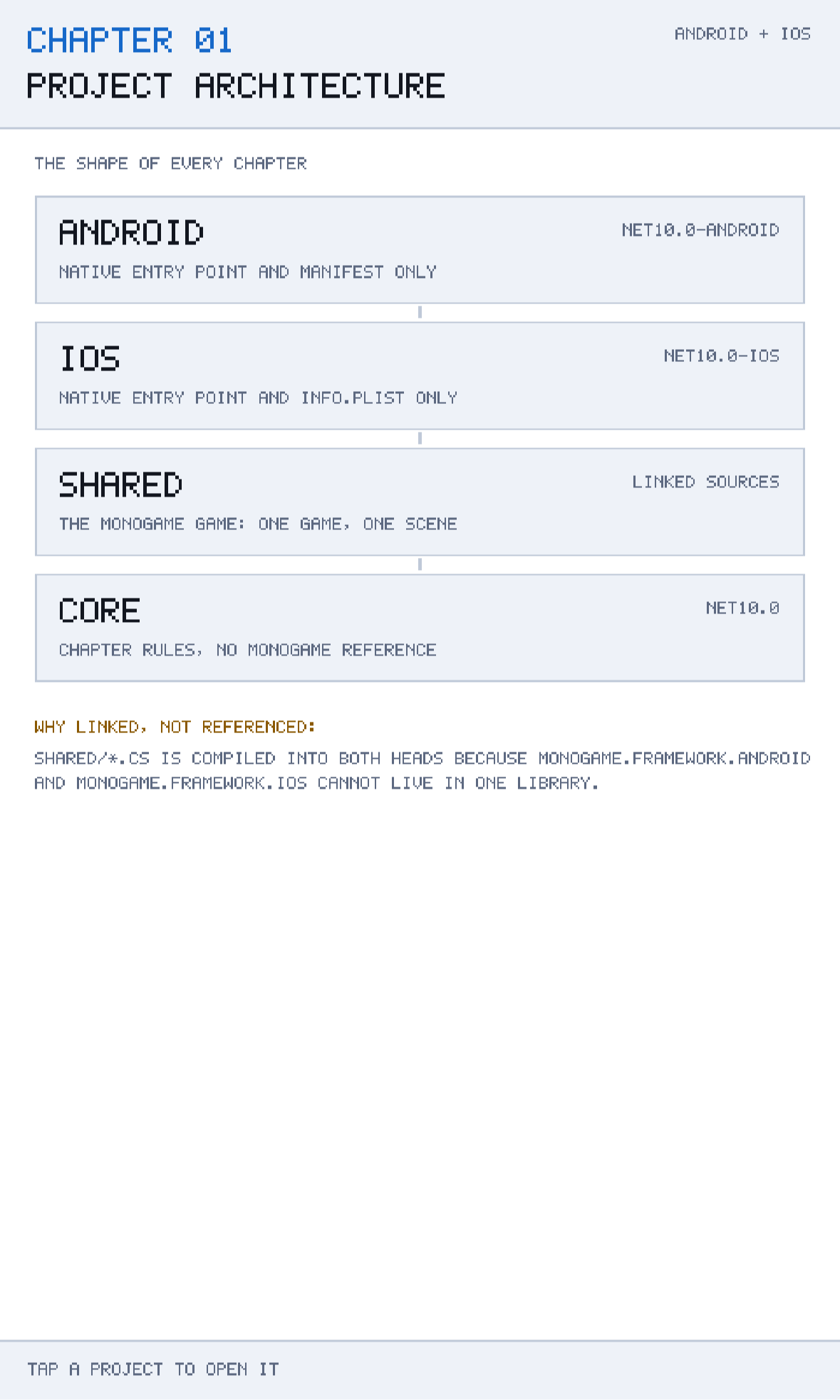
The header and footer you can see around the cards are drawn by ChapterGame, not by the scene, and they are identical in every chapter of this book. The header shows the chapter number, its title and the platforms it builds for; the footer shows a one-line hint supplied by the current scene. Chapter 5 explains how that layout stays correct on every screen size: everything is drawn against a fixed 480 × 800 design space and letterboxed onto whatever the device actually has.
Tap CORE and nothing lights up green, because Core is allowed to reference nothing. That is the whole architecture, demonstrated in one gesture.
Caveats and trade-offs
No layout is free. Here is what this one costs, and what the alternatives cost instead.
You compile everything twice
Every source file in Shared is compiled once per head. On a chapter-sized project that is invisible; on a large game it means your full build is roughly twice the work of a single-target build. In practice this matters less than it sounds, because during development you build one head at a time — you are either on the Android machine or on the Mac — and CI builds both anyway.
IDE support for linked files is uneven
Rider and Visual Studio both handle LinkBase correctly and will show Shared as a folder inside each head. Editing a linked file edits the original, as you would expect. What varies is refactoring: a rename applied while the Android head is the active project may not update usages that only compile under the iOS head, because the iOS head is not in the current compilation context. Build both heads after any large refactor; build-all.sh in the repository root does exactly that for every chapter.
The dependency rule is a convention, not a constraint
Nothing stops a file in Shared from calling into Android APIs when it is compiled into the Android head — it would simply fail to compile in the iOS head, which is a slow and confusing way to find out. The only real defence is that both heads are always built together in CI, so the mistake surfaces within one build rather than one release.
The alternative: a single multi-targeted project
You can write:
<TargetFrameworks>net10.0-android;net10.0-ios</TargetFrameworks>and let MSBuild build one project twice. This is what .NET MAUI does, and it works. The Compile globs disappear, the solution has one project instead of three, and conditional PackageReference elements pull in the right MonoGame assembly per target.
It is a legitimate choice, and it was not taken here for two reasons. First, the platform heads stop being separate compilation units, so nothing prevents platform code and game code from sitting side by side in the same file behind #if ANDROID. Second — and this is the one that decided it for a teaching book — a multi-targeted project is harder to read. When you open src/Chapter01 you can see, from the folder names alone, exactly which code is platform-specific and which is not. That clarity is worth more in a book than the smaller project count.
The alternative: shared projects (.shproj)
The old .shproj "Shared Project" type does exactly what the Compile Include glob does, with IDE support layered on top. It still works. It is also effectively unmaintained, poorly supported outside Visual Studio on Windows, and adds a project type that a reader on a Mac may never have seen. A four-line ItemGroup in each head is more portable and easier to explain.
The Android debug-deployment trap
One setting in the Android head is not architectural but will cost you an afternoon if you skip it:
<EmbedAssembliesIntoApk>true</EmbedAssembliesIntoApk>By default, .NET for Android uses fast deployment in Debug configuration: the APK ships without your managed assemblies, and the build tooling pushes them separately over ADB. That makes dotnet build -t:Run faster, and it makes the resulting APK useless — install it with adb install and it dies at startup, because the assemblies it needs were never inside it. If you plan to hand a debug build to anyone, or to sideload it yourself, set this property and take the slower deploy. Chapter 23 returns to this when it covers release builds properly.
Building and running this chapter
From the chapter folder, either head builds on its own:
cd src/Chapter01
dotnet build Android/Chapter.Android.csproj
dotnet build iOS/Chapter.iOS.csproj
To run on a connected Android device or a running emulator:
dotnet build Android/Chapter.Android.csproj -t:RunAnd on iOS, either open the solution in an IDE and pick a simulator, or build for the simulator runtime and install the resulting bundle by hand:
dotnet build iOS/Chapter.iOS.csproj -p:RuntimeIdentifier=iossimulator-arm64
xcrun simctl install booted \
  iOS/bin/Debug/net10.0-ios/iossimulator-arm64/Chapter01.iOS.app
xcrun simctl launch booted com.monogamebook.chapter01
Which machine do I need?
Android builds run on Windows, macOS and Linux. iOS builds require macOS with Xcode installed, because the signing and packaging tools are Apple's and are not redistributable. If you only have a PC, everything in this book except Chapters 24 and 25 will still work for you.
Try it yourself
- Add a fifth entry to
ArchitectureMap.Layersdescribing a hypotheticalTestsproject targetingnet10.0, and give itCoreas its only allowed dependency. Rebuild and tap it. - Delete the
LinkBaseattribute from the iOS head'sCompileitem and reload the solution. The build still succeeds; look at what happens to the Solution Explorer tree. - Move
ArchitectureMap.csfromCoreintoSharedand build both heads. It still works — which is exactly why the dependency rule needs to be a habit rather than a compiler error. Then move it back. - Add
<PackageReference Include="MonoGame.Framework.Android" Version="3.8.5.1" />toCore/Chapter.Core.csprojand try to build. Read the error carefully: it is the two-assembly problem, stated by NuGet.
Summary
This chapter did not draw a sprite, and that was on purpose. The layout you have just read is the one every remaining chapter of this book assumes, and it exists to answer a single awkward fact: MonoGame ships two mobile assemblies, they cannot coexist in one library, and so compiled code cannot be the sharing boundary. Source code can.
From that one fact the rest follows. Core holds the rules and references nothing, which makes it testable without a graphics device — a promise Chapter 21 collects on by running a real test suite inside the running application. Shared holds the MonoGame game and is compiled into both heads by a Compile Include glob, so there is exactly one copy of the game code and no #if in sight. The two heads hold their platform's entry point and nothing else: an AndroidGameActivity that adopts MonoGame's view, and a UIApplicationDelegate that starts the game from FinishedLaunching. References point downwards, and only downwards.
You also saw the costs honestly: everything compiles twice, IDE refactoring can miss the head you are not currently building, and the dependency rule is a convention rather than something the compiler enforces. Those are real, and they are cheaper than the alternative of untangling platform code from game code later.
Chapter 2 takes the next step in the same spirit. Having established where code lives, it looks at where you should be running it while you write it — and why the fastest way to build a mobile game is often not to look at a phone at all.